Cracking Android SDE2/SDE3 Interviews in 2026: Deep Dives, Code, Follow-ups | Part-2

Architecture & Patterns
21. MVVM vs MVI?
Interviewer: Compare MVVM and MVI — when choose MVI?
Candidate: MVVM: View observes ViewModel state (StateFlow/LiveData), unidirectional updates. Simple for CRUD.
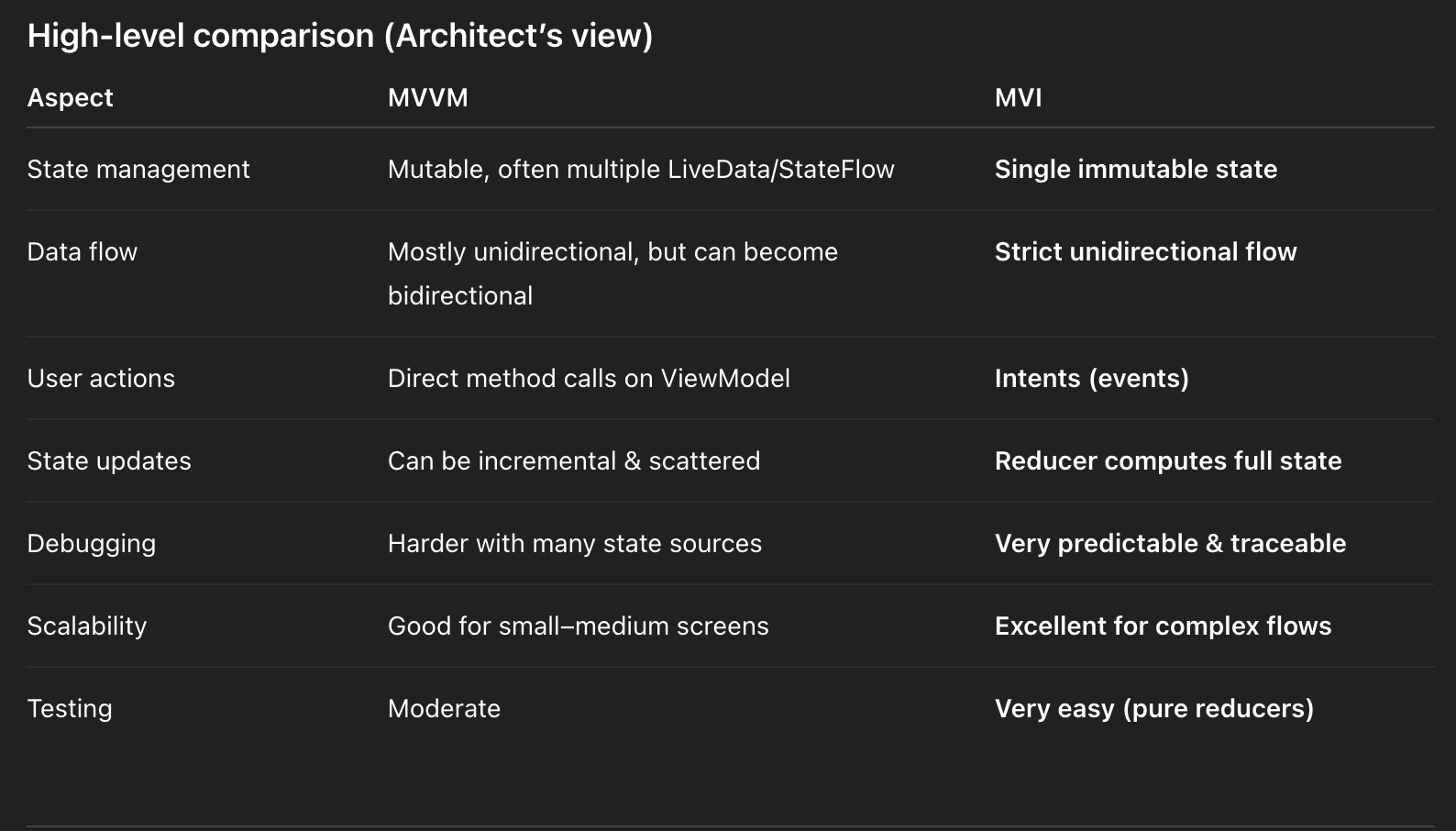
MVVM (Model–View–ViewModel)
How MVVM works
- View observes state from ViewModel
- ViewModel exposes data via
LiveDataorStateFlow - View calls functions directly on ViewModel
- State is often split across multiple variables
Typical MVVM flow
View → ViewModel.method()
ViewModel → update LiveData / StateFlow
View ← observes updates
Example MVVM pattern
class ProfileViewModel : ViewModel() {
    val loading = MutableStateFlow(false)
    val profile = MutableStateFlow<Profile?>(null)
    val error = MutableStateFlow<String?>(null)
    fun loadProfile() {
        loading.value = true
        // fetch profile
    }
}
Problems MVVM faces at scale
- State is scattered
- Hard to know which user action caused which state
- Difficult to replay or debug crashes
- Side effects mixed with state changes
When MVVM is perfect
✅ Simple CRUD screens
✅ Read-only screens
✅ Forms, profile, settings
✅ Small teams & fast delivery
MVI (Model–View–Intent)
Core idea
State is the single source of truth, and every change comes from a user Intent.
MVI flow (strict & predictable)
User Action
   ↓
Intent
   ↓
Reducer (pure function)
   ↓
New State
   ↓
View renders State
No shortcuts. No hidden mutations.
MVI Components Explained
1. Intent
Represents what the user wants to do, not how to do it.
sealed interface PaymentIntent {
    data object Pay : PaymentIntent
    data object Retry : PaymentIntent
}
✔ Clear user actions
✔ Easy to log and replay
2. State (Immutable)
Represents entire UI at a point in time.
@Immutable
data class PaymentState(
    val loading: Boolean = false,
    val error: String? = null,
    val success: PaymentResult? = null
)
✔ One object = whole screen
✔ No partial UI updates
✔ Safe with Compose
3. Reducer (Pure logic)
A reducer takes the current state + intent and returns a new state.
Pure = no side effects → 100% testable
Production-grade MVI ViewModel (Payments Example)
@HiltViewModel
class PaymentViewModel @Inject constructor(
    private val processPayment: ProcessPaymentUseCase
) : ViewModel() {
    private val _state = MutableStateFlow(PaymentState())
    val state: StateFlow<PaymentState> = _state.asStateFlow()
    fun process(intent: PaymentIntent) {
        when (intent) {
            PaymentIntent.Pay -> pay()
            PaymentIntent.Retry -> retry()
        }
    }
    private fun pay() = viewModelScope.launch {
        _state.value = _state.value.copy(loading = true)
        val result = processPayment()
        _state.value = result.fold(
            onFailure = {
                _state.value.copy(
                    loading = false,
                    error = it.message
                )
            },
            onSuccess = {
                _state.value.copy(
                    loading = false,
                    success = it
                )
            }
        )
    }
    private fun retry() {
        _state.value = _state.value.copy(error = null)
    }
}
Why this is enterprise-grade
- 🔁 Every state transition is explicit
- 🧪 Reducer logic is testable
- 🧾 Easy audit trail (important for payments)
- 🔄 State replay possible after crash/process death
- 🧠 Easy onboarding for large teams
When should you choose MVI?
Choose MVI when:
✅ Payments / Checkout / Orders
✅ Fintech, Banking, Trading apps
✅ Multiple UI states & transitions
✅ Compliance & audit requirements
✅ Large teams (clear contracts)
✅ Jetpack Compose-first architecture
Apps like Zomato orders, payments, booking flows benefit heavily from MVI.
Stick with MVVM when:
✅ Simple screens
✅ Fast feature delivery
✅ Low state complexity
✅ Small teams
Final Interview Summary (Perfect Answer)
MVVM is simple and great for CRUD-based screens, but state becomes fragmented as complexity grows.
MVI enforces a single immutable state and strict unidirectional flow, making the system predictable, testable, and scalable.
I choose MVI for complex, high-risk flows like payments or orders, where auditability and correctness matter, and MVVM for simpler screens to avoid over-engineering.
22. Repository with Multi-Source (Network / Cache / Offline)
Interview Question
Design a Repository that supports network, cache, and offline behavior.
High-level Concept
A Repository is a data abstraction layer that:
- Hides where data comes from
- Decides which source to use
- Guarantees consistency, performance, and reliability
In production apps, repositories almost never use a single source.
Core Design Principles
- Single source of truth (SSOT) → usually local cache (Room)
- Strategy pattern → network-first, cache-first, or hybrid
- Reactive streams →
Flowfor real-time updates - Offline-first support
- Clear error & loading states
Common Repository Strategies
1️⃣ Network-First
Used when freshness is critical
- Payments
- Orders
- User balances
Network → Cache → Emit
Fallback to cache on failure
2️⃣ Cache-First
Used when performance matters
- Profile
- Product catalog
- Feed
Cache → Emit
Refresh from network in background
3️⃣ Offline-First (Recommended)
Used in modern Android apps
- UI always reads from cache
- Network updates cache
- Cache emits changes automatically
Production-Grade Multi-Source Repository Design
Result Wrapper (UI-friendly)
sealed interface DataResult<out T> {
    data class Success<T>(val data: T) : DataResult<T>
    data class Error(val throwable: Throwable) : DataResult<Nothing>
    data object Loading : DataResult<Nothing>
}
Data Strategy Contract (Strategy Pattern)
interface DataStrategy<T> {
    fun observe(id: String): Flow<DataResult<T>>
}
✔ Enables swapping strategies
✔ Testable
✔ Open/Closed principle
Network-First Strategy (Realistic Implementation)
class NetworkFirstStrategy<T>(
    private val fetchFromNetwork: suspend () -> T,
    private val fetchFromCache: () -> Flow<T>,
    private val saveToCache: suspend (T) -> Unit
) : DataStrategy<T> {
    override fun observe(id: String): Flow<DataResult<T>> = channelFlow {
        send(DataResult.Loading)
        // Always emit cache first if available
        fetchFromCache()
            .map { DataResult.Success(it) }
            .collect { send(it) }
        try {
            val networkData = fetchFromNetwork()
            saveToCache(networkData)
        } catch (e: Exception) {
            send(DataResult.Error(e))
        }
    }
}
Why this works in production
- UI is never blocked
- Cache is always the SSOT
- Network only updates cache
- Works offline automatically
Repository Implementation
class UserRepository @Inject constructor(
    private val api: UserApi,
    private val dao: UserDao
) {
  private val strategy = NetworkFirstStrategy(
        fetchFromNetwork = { api.getUser() },
        fetchFromCache = { dao.observeUser() },
        saveToCache = { dao.insert(it) }
    )
    fun observeUser(id: String): Flow<DataResult<User>> {
        return strategy.observe(id)
    }
}
Dependency Injection (Hilt)
@Provides
fun provideUserRepository(
    api: UserApi,
    dao: UserDao
): UserRepository = UserRepository(api, dao)
✔ Strategy can be swapped for tests
✔ No ViewModel changes needed
Offline & Delta Sync (Advanced / Real World)
For offline updates:
- Track dirty rows
- Sync only deltas
- Resolve conflicts server-side
@Entity
data class UserEntity(
    val id: String,
    val name: String,
    val isDirty: Boolean
)
Performance & SLA Considerations
- Cache hit ratio target: >80%
- Cold start must never block on network
- Background refresh only
- Paging uses cache as SSOT
Common Pitfalls & Solutions
❌ Stale data
Fix:
- ETag / If-Modified-Since
- Cache TTL
- Versioned responses
❌ Multiple sources emitting inconsistently
Fix:
- Always emit from cache
- Never emit network directly to UI
❌ Repository leaking implementation details
Fix:
- Return domain models only
- No Retrofit / Room types exposed
When Interviewer Pushes Further
Why Flow instead of suspend?
Answer:
Flow allows:
- Cache + network merge
- Real-time updates
- Better Compose integration
- Offline resilience
Final Interview Summary (Perfect Answer)
I design repositories as multi-source data providers using the strategy pattern.
The local cache is the single source of truth, while the network updates it asynchronously.
I expose data asFlowto support offline-first behavior, background refresh, and real-time updates.
Strategies like network-first or cache-first are injected via DI, making the repository scalable, testable, and production-ready.
23. SOLID in Android?
Interviewer Question
How do you apply SOLID principles in Android code?
Why SOLID matters in Android
- Android apps grow feature-heavy very fast
- Multiple teams work on the same codebase
- SOLID enables:
- Maintainability
- Testability
- Parallel development
- Safe refactoring
In production Android apps, SOLID is applied through architecture, not theory.
1️⃣ Single Responsibility Principle (SRP)
A class should have only one reason to change
Android Interpretation
LayerResponsibilityView (Compose / XML)Render stateViewModelUI state & eventsUseCaseBusiness rulesRepositoryData sourcingDAOPersistence only
Example (Correct SRP)
class GetUserUseCase @Inject constructor(
    private val repo: IUserRepository
) {
    operator fun invoke(id: String): Flow<User> = repo.getUser(id)
}

@HiltViewModel
class UserViewModel @Inject constructor(
    private val getUser: GetUserUseCase
) : ViewModel() {
    val user = getUser("123")
}
✔ ViewModel does not know how data is fetched
✔ Business logic isolated
2️⃣ Open / Closed Principle (OCP)
Open for extension, closed for modification
Android Interpretation
- New features should be added without modifying existing code
- Achieved using:
- Interfaces
- Sealed abstractions
- Strategy pattern
Repository Example
interface IUserRepository {
    fun getUser(id: String): Flow<User>
}

@Singleton
class NetworkUserRepository @Inject constructor(
    private val api: Api,
    private val dao: UserDao
) : IUserRepository {
    override fun getUser(id: String): Flow<User> =
        dao.observe(id)
            .onStart { refresh(id) }
    private suspend fun refresh(id: String) {
        dao.insert(api.getUser(id))
    }
}
To add cache-only or mock repository, we extend the interface — no existing code changes.
3️⃣ Liskov Substitution Principle (LSP)
Subtypes must be substitutable for their base types
Android Interpretation
- Any implementation of an interface must behave as expected
- No hidden exceptions
- No breaking contracts
Correct LSP Example
class FakeUserRepository : IUserRepository {
    override fun getUser(id: String): Flow<User> =
        flowOf(User(id, "Test User"))
}
This can safely replace NetworkUserRepository in:
- ViewModels
- UI tests
- Preview builds
✔ Same behavior
✔ No crashes
✔ Same expectations
4️⃣ Interface Segregation Principle (ISP)
Clients should not depend on methods they don’t use
Android Interpretation
- Avoid fat repositories
- Keep DAO & API contracts small
- Separate read/write concerns
Bad ❌
interface UserRepository {
    fun getUser()
    fun deleteUser()
    fun uploadAvatar()
}
Good ✅
interface UserReader {
    fun getUser(id: String): Flow<User>
}

interface UserWriter {
    suspend fun saveUser(user: User)
}
DAOs follow ISP naturally:
@Dao
interface UserReadDao {
    @Query("SELECT * FROM user WHERE id=:id")
    fun observe(id: String): Flow<User>
}
5️⃣ Dependency Inversion Principle (DIP)
Depend on abstractions, not concretions
Android Interpretation
- ViewModel depends on interfaces
- Repository implementations are injected
- Hilt binds interfaces to implementations
Hilt Binding
@Module
@InstallIn(SingletonComponent::class)
abstract class UserModule {
    @Binds
    abstract fun bindUserRepository(
        impl: NetworkUserRepository
    ): IUserRepository
}
ViewModel (DIP Applied)
@HiltViewModel
class UserViewModel @Inject constructor(
    private val repo: IUserRepository
) : ViewModel() {
  val user = repo.getUser("123")
}
✔ Easy testing
✔ Swappable implementations
✔ No tight coupling
SOLID Applied at View Layer
Clean UI contract
interface UserUiState {
    val isLoading: Boolean
    val user: User?
}
Compose observes state only — no logic.
Tooling & Enforcement
- Android Lint → catches SRP violations
- Detekt → enforces complexity limits
- Module boundaries → enforce DIP
- CI rules → architecture checks
This approach scales comfortably to 50+ developers across multiple modules.
Final Interview Summary (Perfect Answer)
I apply SOLID in Android by clearly separating responsibilities across layers, using interfaces for repositories and use cases, and enforcing dependency inversion with Hilt.
ViewModels only manage UI state, repositories handle data sourcing, and business rules live in use cases.
This architecture enables safe extension, easy testing, and scales well for large Android teams.
24. Dependency Injection Hilt scopes?
Interview Question
Explain Hilt scoping strategies and how you manage lifecycles.
Why Scoping Matters
Hilt scopes define:
- How long an object lives
- Who shares it
- When it gets destroyed
Incorrect scoping causes:
❌ Memory leaks
❌ Shared mutable state bugs
❌ Unexpected recreation
❌ Crashes on navigation
Correct scoping gives:
✅ Predictable lifecycles
✅ Performance
✅ Clear ownership
Hilt Component Hierarchy (Must Know)
SingletonComponent
 └── ActivityRetainedComponent
      └── ActivityComponent
           └── FragmentComponent
                └── ViewComponent
Rule: Objects live as long as the component they’re scoped to.
Core Hilt Scopes Explained
1️⃣ @Singleton
Lifecycle: Entire app process
Created: Once
Destroyed: App killed
Use for:
- Retrofit / OkHttp
- Room Database
- Repositories
- App-wide managers
@Module
@InstallIn(SingletonComponent::class)
object NetworkModule {
    @Provides
    @Singleton
    fun provideApi(): Api =
        Retrofit.Builder()
            .build()
            .create(Api::class.java)
}
✔ Safe global sharing
✔ Minimal overhead
2️⃣ @ActivityRetainedScoped
Lifecycle: Survives configuration changes
Destroyed: Activity is truly finished
Use for:
- ViewModel dependencies
- Session-level state
- Navigation-related logic
⚠️ Important correction:
@HiltViewModelalready usesActivityRetainedComponent.
You do NOT annotate ViewModels with@ActivityRetainedScoped.
Correct usage:
@HiltViewModel
class ScopedViewModel @Inject constructor(
    private val analytics: Analytics
) : ViewModel()
Dependency scoped correctly:
@ActivityRetainedScoped
class Analytics @Inject constructor()
✔ Survives rotation
✔ Destroyed when activity finishes
3️⃣ @ActivityScoped
Lifecycle: One Activity instance
Destroyed: On configuration change
Use for:
- UI helpers
- Screen-specific analytics
- Activity-bound objects
@Module
@InstallIn(ActivityComponent::class)
object ActivityModule {
    @Provides
    @ActivityScoped
    fun provideAnalytics(
        activity: Activity
    ): Analytics = Analytics(activity)
}
❌ Not safe for ViewModels
❌ Recreated on rotation
4️⃣ @FragmentScoped
Lifecycle: Fragment instance
Destroyed: Fragment destroyed
Use for:
- Fragment UI logic
- Controllers tied to fragment lifecycle
5️⃣ @ViewModelScoped
Lifecycle: Same ViewModel instance
Destroyed: ViewModel cleared
Use for:
- UseCases
- UI-related state holders
- MVI reducers
@ViewModelScoped
class ProcessPaymentUseCase @Inject constructor(
    private val repo: PaymentRepository
)
✔ Scoped per ViewModel
✔ Avoids global state leaks
6️⃣ @ViewScoped
Lifecycle: View (Compose / XML)
Destroyed: View destroyed
Rarely used, but useful for:
- Custom view logic
- View-specific controllers
Correct Scoping Cheat Sheet
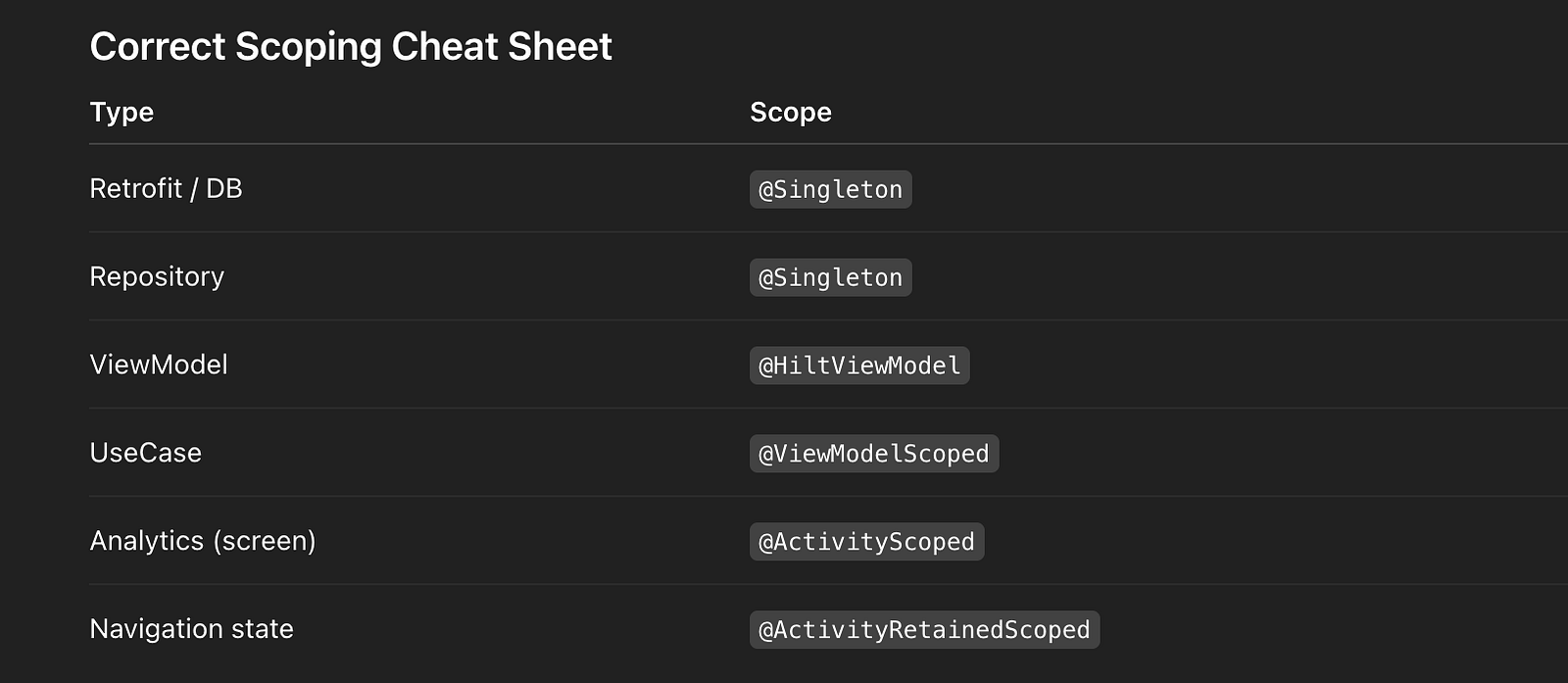
Common Scoping Mistakes (Interview Gold)
❌ Injecting @ActivityScoped into ViewModel
→ Causes crashes or memory leaks
❌ Using @Singleton for UI state
→ State leaks across screens
❌ Unscoped objects with heavy construction
→ Performance issues
Scoping & Navigation (Real World)
- Popping a screen destroys:
- FragmentComponent
- ViewComponent
- ActivityRetained objects survive until:
- Activity is finished
- Singleton survives navigation entirely
This makes navigation graphs predictable.
Production Trade-offs
- Narrowest scope possible is safest
- Singleton only when truly global
- Prefer
ViewModelScopedoverSingleton - Retained scope only for config-sensitive state
Tooling & Debugging
hilt_aggregated_deps→ graph inspection- Strict lint rules for scoping
- Memory profiler to verify destruction
Final Interview Summary (Perfect Answer)
Hilt scopes control object lifetime and ownership.
I use@Singletonfor app-wide dependencies like Retrofit and repositories,@ViewModelScopedfor use cases and UI state, and@ActivityRetainedScopedfor dependencies that must survive configuration changes.
I avoid leaking narrower-scoped objects into wider scopes and always choose the smallest valid scope to ensure safe lifecycle management and predictable behavior in large Android apps.
25. Clean Arch layers?
Interview Question
Explain Clean Architecture layers and how you apply them in Android.
What Clean Architecture Solves
Clean Architecture focuses on:
- Separation of concerns
- Business rules independent of frameworks
- High testability
- Replaceable implementations (APIs, DBs, UI)
In Android, this prevents:
❌ Framework lock-in
❌ Un-testable business logic
❌ God ViewModels
Core Rule (Most Important)
Dependencies always point inward
Outer layers depend on inner layers.
Domain never depends on Android, Retrofit, Room, or UI.
Clean Architecture Layers (Android View)
Presentation  →  Domain  ←  Data
(UI / VM)        (Pure)      (Adapters)
Or more detailed:
UI (Compose/XML)
   ↓
ViewModel
   ↓
UseCase (Domain)
   ↑
Repository Interface (Port)
   ↑
Repository Impl / API / DB (Data)
1️⃣ Domain Layer (Core Business Rules)
Characteristics
- Pure Kotlin
- No Android imports
- No frameworks
- 100% unit-testable
- Contains Entities + UseCases
Example: Payment Use Case
class ProcessPayment(
    private val gatewayPort: PaymentPort
) {
    suspend operator fun invoke(
        amount: BigDecimal
    ): Result<Payment> =
        gatewayPort.charge(amount)
}
Port (Interface)
interface PaymentPort {
    suspend fun charge(amount: BigDecimal): Result<Payment>
}
✔ Domain defines what it needs, not how it’s done
2️⃣ Data Layer (Adapters & Implementations)
Responsibilities
- Implements ports defined by Domain
- Talks to:
- Network (Retrofit)
- Cache (Room)
- File system
- Maps DTO ↔ Domain models
Adapter Example
class StripeAdapter @Inject constructor(
    private val stripeApi: StripeApi
) : PaymentPort {
    override suspend fun charge(
        amount: BigDecimal
    ): Result<Payment> =
        stripeApi.charge(amount)
            .toDomain()
}
✔ Can be replaced without touching Domain
✔ Stripe → Razorpay → Mock adapter
3️⃣ Presentation Layer (UI & State)
Responsibilities
- Render UI
- Handle user events
- Call UseCases
- Hold UI state
ViewModel Example
@HiltViewModel
class PaymentViewModel @Inject constructor(
    private val processPayment: ProcessPayment
) : ViewModel() {
    fun pay(amount: BigDecimal) {
        viewModelScope.launch {
            processPayment(amount)
        }
    }
}
✔ No business logic
✔ No Retrofit / DB
✔ Pure orchestration
Dependency Injection (Hilt Binding Ports)
@Module
@InstallIn(SingletonComponent::class)
abstract class PaymentModule {
    @Binds
    abstract fun bindPaymentPort(
        impl: StripeAdapter
    ): PaymentPort
}
✔ Domain unaware of Stripe
✔ Easy testing & replacement
Ports & Adapters (Why Interviewers Love This)
- Ports → interfaces in Domain
- Adapters → implementations in Data
- Enables:
- Hexagonal Architecture
- Clean Architecture
- Test doubles
Testing Strategy (Production Reality)
LayerTest TypeDomainUnit tests (100%)DataIntegration testsPresentationViewModel testsUIInstrumentation
Domain layer achieves near-100% coverage.
Common Mistakes (Interview Traps)
❌ ViewModel contains business logic
❌ Domain imports Retrofit / Android
❌ Repository returns DTOs to UI
❌ Entities depend on Room annotations
When Clean Architecture Is Worth It
Use Clean Architecture when:
✅ Business logic is complex
✅ Multiple data sources
✅ Long-term product
✅ Large teams
✅ Compliance / payments
Avoid overkill when:
❌ Simple apps
❌ MVPs
❌ One-screen tools
Scaling Benefits
- Teams work independently
- Framework upgrades are isolated
- Easy to add new APIs
- Reduced regression risk
Final Interview Summary (Perfect Answer)
I structure Android apps using Clean Architecture with three core layers: Presentation, Domain, and Data.
The Domain layer is pure Kotlin and contains entities and use cases, completely independent of Android or frameworks.
The Data layer implements domain-defined ports using APIs or databases, while the Presentation layer orchestrates UI state through ViewModels.
Dependencies always point inward, making the system highly testable, scalable, and resilient to change.
26. Version catalogs multi-module?
Managing Dependencies in Large Multi-Module Android Projects
Interview Question
How do you manage dependencies in a large multi-module Android codebase?
High-level Strategy
In large Android codebases (50+ modules), dependency management must:
- Eliminate version drift
- Avoid dependency hell
- Support safe global upgrades
- Be reviewable & auditable
My approach is:
Gradle Version Catalogs + strict module boundaries + CI validation
1️⃣ Gradle Version Catalogs (Single Source of Truth)
Why Version Catalogs
- Centralizes all versions & libraries
- Enforces atomic upgrades
- Removes hard-coded versions from modules
- Improves discoverability and IDE support
Root libs.versions.toml
[versions]
kotlin = "1.9.22"
compose = "1.6.0"
hilt = "2.48"
androidxCore = "1.12.0"

[libraries]
androidx-core-ktx = { group = "androidx.core", name = "core-ktx", version.ref = "androidxCore" }
compose-ui = { group = "androidx.compose.ui", name = "ui", version.ref = "compose" }
compose-tooling = { group = "androidx.compose.ui", name = "ui-tooling", version.ref = "compose" }
hilt-navigation-compose = { group = "androidx.hilt", name = "hilt-navigation-compose", version.ref = "hilt" }
hilt-compiler = { group = "com.google.dagger", name = "hilt-compiler", version.ref = "hilt" }

[bundles]
compose = ["compose-ui", "compose-tooling"]
2️⃣ Usage in Feature Modules (Clean & Consistent)
// :feature:cart:build.gradle.kts
dependencies {
    implementation(libs.androidx.core.ktx)
    implementation(libs.bundles.compose)
    implementation(libs.hilt.navigation.compose)
    kapt(libs.hilt.compiler)
}
Benefits
- No versions in modules
- Easy refactors
- IDE auto-completion
- One-line global upgrades
3️⃣ Scaling to 50+ Modules (Monorepo Reality)
Enforced Rules
- No direct version usage in modules
- No dynamic versions (
+) - Feature modules depend only on:
:domain:core- Public APIs
Result
- Predictable dependency graph
- Faster builds
- Reduced binary size
4️⃣ Plugin Version Management (Important Pitfall)
Plugins are NOT libraries
They must be handled separately.
settings.gradle.kts
pluginManagement {
    plugins {
        id("com.android.application") version "8.3.0"
        id("org.jetbrains.kotlin.android") version "1.9.22"
        id("dagger.hilt.android.plugin") version "2.48"
    }
}
✔ Avoids mismatch between Gradle & plugins
✔ Prevents build breakage
5️⃣ CI Enforcement & Safety Nets
What CI Validates
- Version catalog diffs reviewed explicitly
- No module introduces its own versions
- Dependency graph doesn’t violate layering
- Duplicate dependencies flagged
Tooling
- Gradle Dependency Analysis Plugin
- Custom lint rules
- Build scan audits
6️⃣ Dependency Upgrade Strategy (Production)
Safe Upgrade Process
- Update one version in
libs.versions.toml - Run affected module tests
- Validate binary compatibility
- Roll forward atomically
Result
One change safely ripples across the entire monorepo.
7️⃣ Common Pitfalls (Interview Gold)
❌ Plugin versions mixed into catalog
→ Causes Gradle resolution issues
❌ Feature modules declaring transitive deps
→ Leads to classpath leaks
❌ Different Compose versions per module
→ Runtime crashes
❌ No ownership of version updates
→ Silent drift
8️⃣ Why This Scales Organizationally
Without CatalogsWith CatalogsVersion driftSingle sourcePainful upgradesAtomic upgradesHidden couplingExplicit graphBuild instabilityPredictable builds
This setup comfortably supports 50+ modules and multiple teams.
Final Interview Summary
In large multi-module Android projects, I manage dependencies using Gradle Version Catalogs as a single source of truth.
All library versions live in libs.versions.toml, feature modules reference aliases only, and upgrades are atomic and reviewable.Plugin versions are managed separately in settings.gradle, and CI enforces dependency rules to prevent drift.This approach eliminates version hell and scales safely across dozens of modules and teams.
27. Circular deps avoidance?
Preventing Circular Dependencies in a Modular Android App
Interview Question
How do you prevent circular dependencies in a large modular Android application?
Why Circular Dependencies Are Dangerous
Circular dependencies:
- Break Gradle builds
- Hide architectural violations
- Create tight coupling
- Block parallel development
- Cause runtime initialization bugs
At scale, circles kill velocity.
High-level Strategy
I prevent circular dependencies by enforcing:
- Directed module graph (DAG)
- Vertical feature modules
- Interface-based boundaries
- Automated architectural enforcement
1️⃣ Enforce a Directed Acyclic Graph (DAG)
Rule
Dependencies must flow in one direction only
Typical Layered Flow
:core
  ↓
:domain
  ↓
:data
  ↓
:feature:cart
❌ No back edges
❌ No feature → feature dependencies
❌ No data → feature dependencies
2️⃣ Vertical Feature Modules (Slice by Feature)
Instead of horizontal modules like :ui, :viewmodel, we use:
:feature:cart
:feature:checkout
:feature:profile
Each feature contains:
- UI
- ViewModel
- Feature-specific state
They depend only on core abstractions and domain, never on each other.
3️⃣ Interfaces as Boundaries (Dependency Inversion)
Problem
Feature A needs functionality from Feature B → cycle risk
Solution
- Extract contract into
:core:commonor:domain - Feature B implements it
- Feature A depends only on the interface
// :core:common
interface AnalyticsTracker {
    fun track(event: String)
}

// :feature:cart
class CartAnalytics @Inject constructor() : AnalyticsTracker
No feature-to-feature dependency required.
4️⃣ Gradle-Level Enforcement
settings.gradle.kts
include(":core:common")
include(":domain")
include(":data:network")
include(":feature:cart")

#Root dependency constraints

// Convention plugin
dependencies {
    implementation(project(":domain"))
}
✔ Dependencies declared centrally
✔ No ad-hoc linking
5️⃣ Automated Architecture Tests (Non-Negotiable)
ArchUnit Tests (Production-Grade)
class ArchitectureTest {
    @Test
    fun `domain layer has no Android dependencies`() {
        noClasses()
            .that().resideInAPackage("..domain..")
            .should().dependOnClassesThat()
            .resideInAnyPackage("android..")
    }
    @Test
    fun `no circular module dependencies`() {
        noCycles()
    }
}
✔ Fails CI on violation
✔ Prevents architectural drift
6️⃣ Visualization & Debugging
Tools Used
./gradlew :app:dependencies- Gradle Build Scans
- IntelliJ module graph
This makes the dependency DAG visible and reviewable.
7️⃣ Organizational Rules (What Actually Works)
- Feature modules cannot depend on other features
- Shared code must live in
:core - Domain owns business contracts
- Data implements domain interfaces
- CI blocks unauthorized dependencies
8️⃣ Scaling to 100+ Modules
Without EnforcementWith EnforcementHidden cyclesExplicit DAGBuild instabilityPredictable buildsTight couplingLoose contractsSlow refactorsSafe refactors
This approach has kept 100-module Android apps stable over years.
Common Interview Follow-ups
What if two features need each other?
They don’t.
They depend on a shared abstraction.
Isn’t this overkill?
Only until the app grows.
After ~20 modules, this becomes mandatory.
Final Interview Summary
I prevent circular dependencies by enforcing a strict directed module graph, organizing code into vertical feature modules, and using interfaces to define boundaries.
Dependencies always flow one way, and architectural rules are enforced through ArchUnit tests and CI.
This keeps the dependency graph acyclic, scalable, and stable even in large Android monorepos.
28. Observer pattern impl?
Interview Question
How would you implement the Observer pattern in Android without LiveData or Rx?
High-level Answer
In modern Android, I implement the Observer pattern using Kotlin Coroutines + Flow.
StateFlow→ state observation (hot, replayable)SharedFlow→ event observation (no state ownership)
Flows give:
- Thread safety
- Backpressure handling
- Lifecycle awareness
- Structured concurrency
This is a clean, production-grade Observer pattern.
Mapping Observer Pattern → Flow
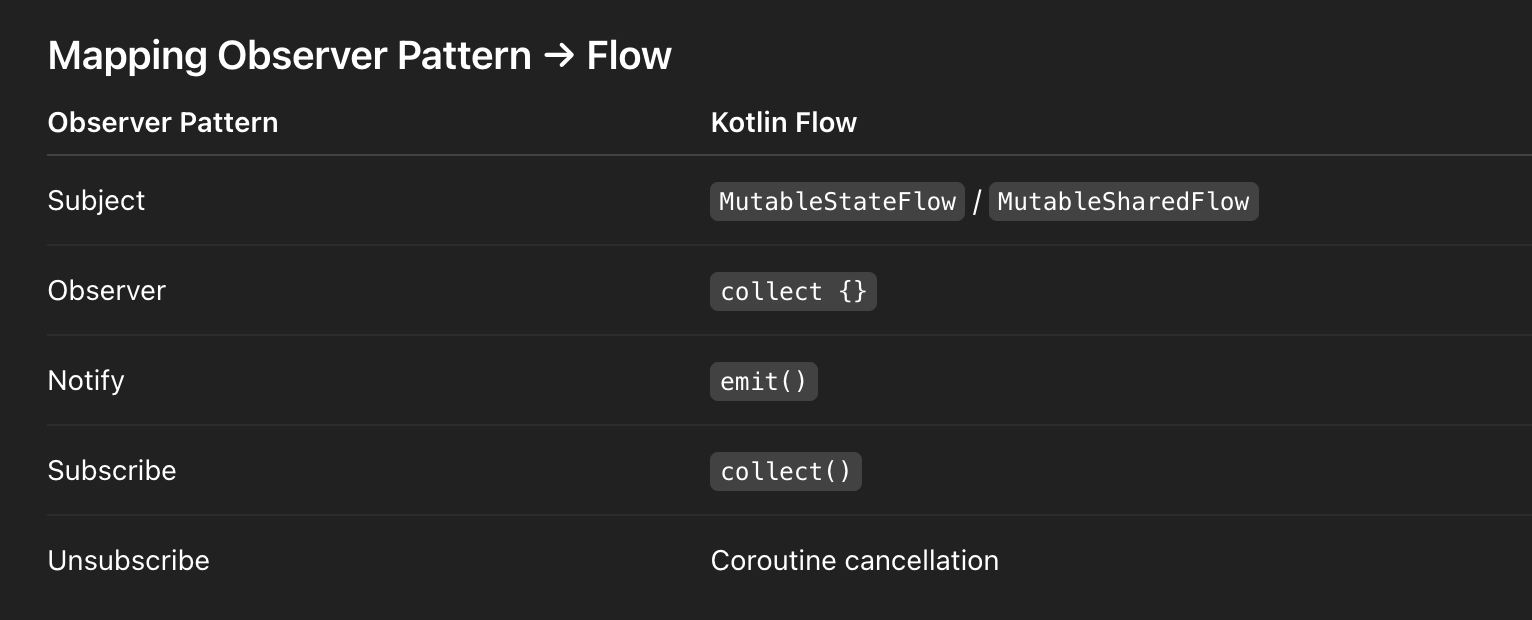
Choosing the Right Flow Type
Use StateFlow when:
- You observe state
- New observers need the latest value
- UI rendering
Use SharedFlow when:
- You observe events
- No replay needed (or controlled replay)
- One-off actions
Custom Observable (Observer Pattern)
Observable using SharedFlow
class ObservableList<T> {
  private val _items =
        MutableSharedFlow<List<T>>(replay = 1)
    val items: SharedFlow<List<T>> =
        _items.asSharedFlow()
    suspend fun update(newItems: List<T>) {
        _items.emit(newItems)
    }
    fun observe(
        scope: CoroutineScope,
        onChange: (List<T>) -> Unit
    ) {
        scope.launch {
            items.collect(onChange)
        }
    }
}
✔ Hot observable
✔ Replay last value
✔ Thread-safe
✔ Backpressure-safe
Usage (UI Layer)
val observableUsers = ObservableList<User>()

viewLifecycleOwner.lifecycleScope.launchWhenStarted {
    observableUsers.items.collect {
        adapter.submitList(it)
    }
}
observableUsers.update(users)
✔ Lifecycle-aware
✔ Observer auto-unsubscribes
✔ No memory leaks
State-based Observer (StateFlow Example)
class UserStore {
  private val _state =
        MutableStateFlow<List<User>>(emptyList())
    val state: StateFlow<List<User>> = _state
    fun update(users: List<User>) {
        _state.value = users
    }
}
Why StateFlow is ideal for state
- Always has a value
- New observers instantly receive latest state
- Built-in
distinctUntilChanged()
Backpressure & Threading (Production Detail)
- Flow suspends emitters if collectors are slow
- No dropped values unless configured
- Structured concurrency prevents leaks
Common Pitfalls (Interview Gold)
❌ Using GlobalScope
→ Causes leaks
❌ Collecting outside lifecycle
→ UI crashes
❌ Using SharedFlow for state accidentally
→ Missing initial data
✅ Correct Fix
Always collect in:
viewLifecycleOwner.lifecycleScopeWhy This Is Better Than Manual Observer Lists
❌ Manual list of observers
❌ Synchronization issues
❌ Hard unsubscribe logic
✔ Flow handles all of this safely
When NOT to use Flow
- Extremely simple callbacks
- Performance-critical hot paths (rare)
Otherwise, Flow is the default Observer pattern in modern Android.
Final Interview Summary (Perfect Answer)
I implement the Observer pattern using Kotlin Flows.
StateFlowis used for observable state, whileSharedFlowis used for events.
This provides a hot, lifecycle-aware, backpressure-safe observer mechanism without relying on LiveData or Rx, and integrates cleanly with structured concurrency in production Android apps.
29. Singleton thread-safe?
Interview Question
How do you implement a thread-safe Singleton in Kotlin?
High-level Answer
In Kotlin, the preferred way to create a thread-safe singleton is:
objectdeclaration (language-level guarantee)- Dependency Injection (
@Singletonvia Hilt) for testability
Manual singleton patterns are only needed in very specific low-level cases.
1️⃣ Kotlin object (Best Default)
object Logger {
    fun log(message: String) {
        // thread-safe by default
    }
}
Why this works
- Initialization is lazy
- Initialization is thread-safe
- Guaranteed by the Kotlin language spec
- No synchronization boilerplate
Use cases
- Stateless utilities
- Pure helpers
- No dependencies
- No need for mocking
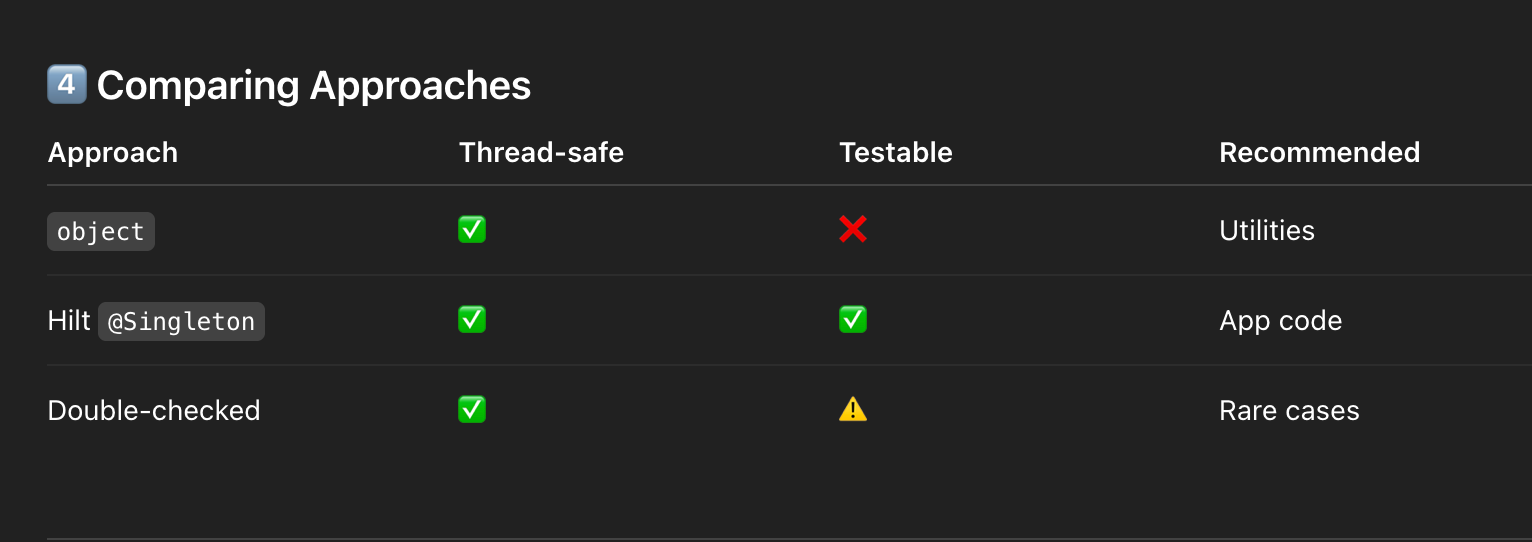
2️⃣ Dependency Injection Singleton (Recommended in Apps)
In real Android apps, DI-managed singletons are preferred over manual ones.
Hilt-managed Singleton
@Singleton
class Logger @Inject constructor() {
    fun log(msg: String) {
        // send to Sentry
    }
}


@Module
@InstallIn(SingletonComponent::class)
object LoggerModule {
    @Provides
    @Singleton
    fun provideLogger(): Logger = Logger()
}
Why DI is better
- Testable (fake implementations)
- Lifecycle-aware
- Clear ownership
- Avoids global state
3️⃣ Manual Singleton (Double-Checked Locking)
Only use this when:
- You cannot use DI
- You need lazy initialization with parameters
- You are writing low-level libraries
Correct Implementation
class Logger private constructor() {
    companion object {
        @Volatile
        private var INSTANCE: Logger? = null
        fun get(): Logger =
            INSTANCE ?: synchronized(this) {
                INSTANCE ?: Logger().also {
                    INSTANCE = it
                }
            }
    }
    fun log(msg: String) { }
}
Why @Volatile matters
- Prevents instruction reordering
- Guarantees visibility across threads
4️⃣ Comparing Approaches
Common Pitfalls (Interview Gold)
❌ Global singletons for state
→ Hard to test, hidden coupling
❌ Context leaks in singleton
→ Memory leaks
❌ Enum singletons in Android
→ Serialization / reflection issues
Final Interview Summary (Perfect Answer)
Kotlin’sobjectdeclaration provides a lazy, thread-safe singleton out of the box and is ideal for stateless utilities.
In Android applications, I prefer dependency-injected singletons using Hilt’s@Singletonscope for better testability and lifecycle control.
Manual double-checked locking is only used in rare low-level cases where DI isn’t possible.
30. Adapter pattern?
Interview Question
Can you explain the Adapter pattern with an Android example?
What the Adapter Pattern Is
The Adapter pattern converts one interface into another that a client expects, allowing incompatible components to work together without modifying their source code.
Key Goal
- Decouple client code from concrete implementations
- Enable integration without refactoring existing systems
Adapter Pattern in Android (Common Examples)
Android ExampleWhat’s Being AdaptedRecyclerView.AdapterData → ViewHoldersListAdapter + DiffUtilLists → UI updatesAPI DTO → Domain ModelNetwork → BusinessDomain → UI ModelBusiness → PresentationPayment Gateway AdapterThird-party SDK → App contract
RecyclerView as a Classic Adapter Pattern
RecyclerView does not understand your data model.
The adapter translates data into views.
Production Example: UI Adapter + Mapper (Clean Architecture)
Domain → UI Adapter (Mapper)
interface Mapper<I, O> {
    fun map(input: I): O
}

class UserDomainToUiMapper : Mapper<UserDomain, UserUi> {
    override fun map(domain: UserDomain): UserUi =
        UserUi(
            id = domain.id,
            name = domain.name.uppercase()
        )
}
✔ Domain model untouched
✔ UI-specific transformation isolated
RecyclerView Adapter (Client)
class UiUserAdapter(
    private val mapper: UserDomainToUiMapper
) : ListAdapter<UserUi, UserViewHolder>(
    UserDiffCallback()
) {
    override fun onCreateViewHolder(
        parent: ViewGroup,
        viewType: Int
    ): UserViewHolder =
        UserViewHolder(
            UserItemBinding.inflate(
                LayoutInflater.from(parent.context),
                parent,
                false
            )
        )
    override fun onBindViewHolder(
        holder: UserViewHolder,
        position: Int
    ) {
        holder.bind(getItem(position))
    }
}
Why this is a true Adapter Pattern
- RecyclerView expects
ViewHolder - App has
UserUi - Adapter bridges the mismatch
DiffUtil = Performance Adapter
class UserDiffCallback : DiffUtil.ItemCallback<UserUi>() {
    override fun areItemsTheSame(
        oldItem: UserUi,
        newItem: UserUi
    ) = oldItem.id == newItem.id
    override fun areContentsTheSame(
        oldItem: UserUi,
        newItem: UserUi
    ) = oldItem == newItem
}
✔ Minimal UI updates
✔ Smooth 60fps scrolling
✔ Automatic diff calculation
Adapter Pattern Beyond RecyclerView (Interview Bonus)
Third-party SDK Adapter
interface PaymentGateway {
    suspend fun pay(amount: BigDecimal): Result<Payment>
}

class StripeAdapter(
    private val stripeSdk: StripeSdk
) : PaymentGateway {
    override suspend fun pay(
        amount: BigDecimal
    ): Result<Payment> =
        stripeSdk.charge(amount).toDomain()
}
✔ App depends on abstraction
✔ SDK can be swapped
Common Pitfalls (Production Reality)
❌ Mixing domain models directly in UI adapters
→ Leaks business logic
❌ Heavy logic inside onBindViewHolder
→ Jank
❌ Missing stable IDs (Paging)
→ Flicker & incorrect animations
override fun getItemId(position: Int): Long =
    getItem(position).id.hashCode().toLong()
When to Use Adapter Pattern
✅ Integrating legacy code
✅ Bridging third-party SDKs
✅ Mapping between architecture layers
✅ RecyclerView & Paging
Final Interview Summary (Perfect Answer)
The Adapter pattern allows incompatible interfaces to work together by wrapping one in another.
In Android, RecyclerView adapters are a classic example, translating data models into ViewHolders.
In production, I also use adapters to map domain models to UI models or wrap third-party SDKs, keeping the system decoupled, testable, and performant.
EmailId: vikasacsoni9211@gmail.com
LinkedIn: https://www.linkedin.com/in/vikas-soni-052013160/
Happy Learning ❤️


Comments
Post a Comment