Cracking Android SDE2/SDE3 Interviews in 2026: Deep Dives, Code, Follow-ups | Part-4

Kotlin/Coroutines
41. CoroutineScope — Types, Usage, and Architectural Pitfalls
What is a CoroutineScope (Architect View)?
A CoroutineScope defines the lifetime of coroutines.
It answers one critical question:
When should this coroutine be cancelled?
If you get scopes wrong, you get:
- memory leaks
- crashes after configuration change
- background work running forever
- UI updates after destruction
Scope choice = lifecycle correctness.
Core Principle (Must Say in Interview)
Never launch a coroutine without knowing who cancels it.
Built-in Coroutine Scopes in Android
1. viewModelScope
Lifecycle:
✔ Active while ViewModel exists
✖ Cancelled when ViewModel.onCleared() is called
Threading:
- Default dispatcher:
Dispatchers.Main.immediate
Primary Use Case:
- Business logic
- Network calls
- Database operations
- State management
Why it exists:
ViewModels survive configuration changes. If you used lifecycleScope, your network calls would restart on rotation.
When to Use viewModelScope
✔ Fetching data
✔ Calling repositories
✔ Updating UI state
✔ Long-running tasks tied to screen data
❌ UI events
❌ Animation
❌ One-shot user actions inside Compose
Production Example (Correct)
class NetworkVm : ViewModel() {
    fun fetchData() = viewModelScope.launch {
        try {
            val data = withContext(Dispatchers.IO) {
                api.fetch()
            }
            _uiState.update { it.copy(data = data) }
        } catch (e: CancellationException) {
            // Expected – ViewModel cleared
            throw e
        } catch (e: Exception) {
            _uiState.update { it.copy(error = e.message) }
        }
    }
}
Senior Notes:
CancellationExceptionmust not be swallowedwithContext(IO)is preferred over launching nested IO coroutines- ViewModel owns the work, not the UI
2. lifecycleScope
Lifecycle:
- Cancelled at
ON_DESTROY - Available in
Activity&Fragment
Primary Use Case:
- UI-driven work
- Short-lived tasks
- Collecting flows bound to UI visibility
Typical Use Cases
✔ Observing Flow / LiveData
✔ Animations
✔ UI events
✔ Permission requests
❌ Network calls that must survive rotation
❌ Business logic
Best Practice (repeatOnLifecycle)
lifecycleScope.launch {
    repeatOnLifecycle(Lifecycle.State.STARTED) {
        viewModel.uiState.collect { state ->
            render(state)
        }
    }
}
Why this matters:
- Automatically pauses collection when UI is stopped
- Prevents wasted CPU and memory leaks
3. rememberCoroutineScope (Jetpack Compose)
Lifecycle:
✔ Survives recompositions
✖ Cancelled when Composable leaves composition
Primary Use Case:
- UI events (clicks, gestures)
- Snackbar
- Animations
- Calling ViewModel methods
Why NOT LaunchedEffect here?
LaunchedEffectrestarts on key changerememberCoroutineScopeis event-driven, not state-driven
Correct Usage Example
@Composable
fun NetworkScreen(vm: NetworkVm = hiltViewModel()) {
    val scope = rememberCoroutineScope()
    Button(onClick = {
        scope.launch {
            vm.fetchData()
        }
    }) {
        Text("Fetch")
    }
}
Architect Rule:
UI triggers → rememberCoroutineScope
Business logic → viewModelScope
4. GlobalScope (⚠️ Danger Zone)
Lifecycle:
❌ Lives as long as the process
❌ Never cancelled automatically
Why It’s Bad
- Memory leaks
- Background work continues after app exit
- No lifecycle awareness
- Impossible to test reliably
When (Almost) Allowed
✔ Very rare app-wide fire-and-forget tasks
✔ One-time process initialization
✔ Instrumentation tests
Interview Answer (Strong)
GlobalScope should not be used in production because it breaks structured concurrency and leaks work beyond lifecycle.
Structured Concurrency (Senior Topic)
Parent–Child Cancellation Rule
viewModelScope.launch {
    launch { taskA() }
    launch { taskB() }
}
If parent cancels → children cancel automatically
supervisorScope (Critical Concept)
Use when one failure should NOT cancel siblings
viewModelScope.launch {
    supervisorScope {
        launch { fetchProfile() }
        launch { fetchFeed() }
    }
}
✔ One API failure doesn’t cancel others
✔ Used heavily in parallel network requests
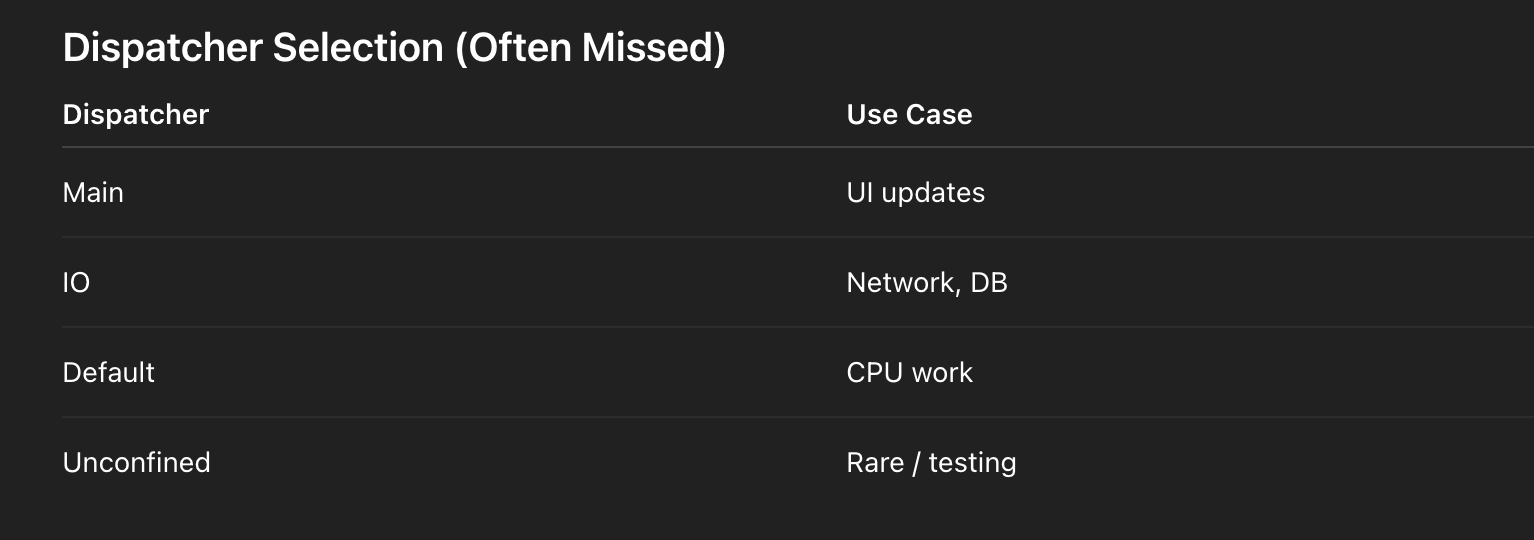
Dispatcher Selection (Often Missed)
Rule:
Scope defines lifecycle, Dispatcher defines thread.
Common Interview Pitfalls (Call Them Out)
❌ Launching coroutines in Fragment constructor
❌ Using GlobalScope for API calls
❌ Catching Exception without rethrowing CancellationException
❌ Using lifecycleScope for repository logic
❌ Nesting scopes unnecessarily
One-Line Summary (Interview Gold)
CoroutineScope defines who owns the work and when it must stop. In Android, ViewModel owns business logic (viewModelScope), UI owns rendering (lifecycleScope), Compose events userememberCoroutineScope, andGlobalScopeis avoided to enforce structured concurrency.
42. Dispatchers + custom?
What is a Dispatcher?
A CoroutineDispatcher decides where (on which thread or pool) a coroutine runs.
Scope controls lifecycle
Dispatcher controls execution context
Both are orthogonal and must be chosen independently.
Standard Dispatchers (Deep Dive)
1. Dispatchers.Main
What it is:
- Android’s main (UI) thread
- Backed by
Looper.getMainLooper()
Used for:
✔ UI updates
✔ State rendering
✔ ViewModel → UI communication
❌ Heavy work
❌ Blocking calls (Thread.sleep, DB, network)
Main vs Main.immediate (Advanced)
Dispatchers.Main
Dispatchers.Main.immediate
Key difference:
Main: always posts to message queueMain.immediate: runs immediately if already on Main
Why it matters:
- Avoids unnecessary frame delay
- Used internally by
viewModelScope
Architect Insight:
Immediate reduces UI jank by skipping extra dispatch hops.
2. Dispatchers.IO
What it is:
- Optimized for blocking IO
- Shared elastic thread pool
- Max threads ≈ 64 or number of cores (whichever larger)
Used for:
✔ Network (Retrofit)
✔ Disk I/O
✔ Database
✔ File operations
Important Misconception
❌ IO is not just “background”
✔ It is for blocking tasks
Retrofit + OkHttp:
- Already async → still call from IO for safety
- Room → internally switches to IO
Performance Insight
IO avoids starving CPU-bound tasks by isolating blocking operations.
3. Dispatchers.Default
What it is:
- Optimized for CPU-intensive work
- Thread count ≈ number of CPU cores
Used for:
✔ Image processing
✔ JSON parsing
✔ Encryption
✔ Sorting / filtering large lists
❌ Network
❌ Disk I/O
Rule of Thumb
If the task keeps the CPU busy, use Default.4. Dispatchers.Unconfined (⚠️ Advanced / Dangerous)
What it is:
- Starts in caller thread
- Resumes in whatever thread suspends
Used for:
✔ Debugging
✔ Testing
✔ Very low-level coroutine internals
❌ Production business logic
❌ UI work
Why It’s Dangerous
launch(Dispatchers.Unconfined) {
    delay(100)
    updateUI() // ❌ Might not be on Main
}
Architect Quote:
Unconfined breaks mental models and should be avoided.
Dispatcher Switching (Best Practice)
viewModelScope.launch {
    val data = withContext(Dispatchers.IO) {
        api.fetch()
    }
    render(data) // back on Main
}
✔ Cleaner than nested launch
✔ Structured concurrency preserved
✔ Exception propagation works correctly
Custom Dispatchers (Production Use Cases)
Why Create a Custom Dispatcher?
✔ Limit parallelism
✔ Isolate heavy workloads
✔ Prevent starvation
✔ Tune performance
Fixed Thread Pool Example
val customDispatcher =
    Executors.newFixedThreadPool(4).asCoroutineDispatcher()

scope.launch(customDispatcher) {
    heavyCompute()
}
⚠️ Critical: Shutdown
customDispatcher.close()Failing to close = thread leak
Best Practice Pattern
class ImageProcessor : Closeable {
    private val dispatcher =
        Executors.newFixedThreadPool(2).asCoroutineDispatcher()
    suspend fun process() =
        withContext(dispatcher) { /* work */ }
    override fun close() {
        dispatcher.close()
    }
}
limitedParallelism() (Modern & Preferred)
val ioLimited = Dispatchers.IO.limitedParallelism(8)Why it’s better:
- No new threads created
- Uses shared pool
- Safer & lighter than Executors
Real-World Use Cases
✔ Throttle API calls
✔ Limit DB writes
✔ Rate-limit image decoding
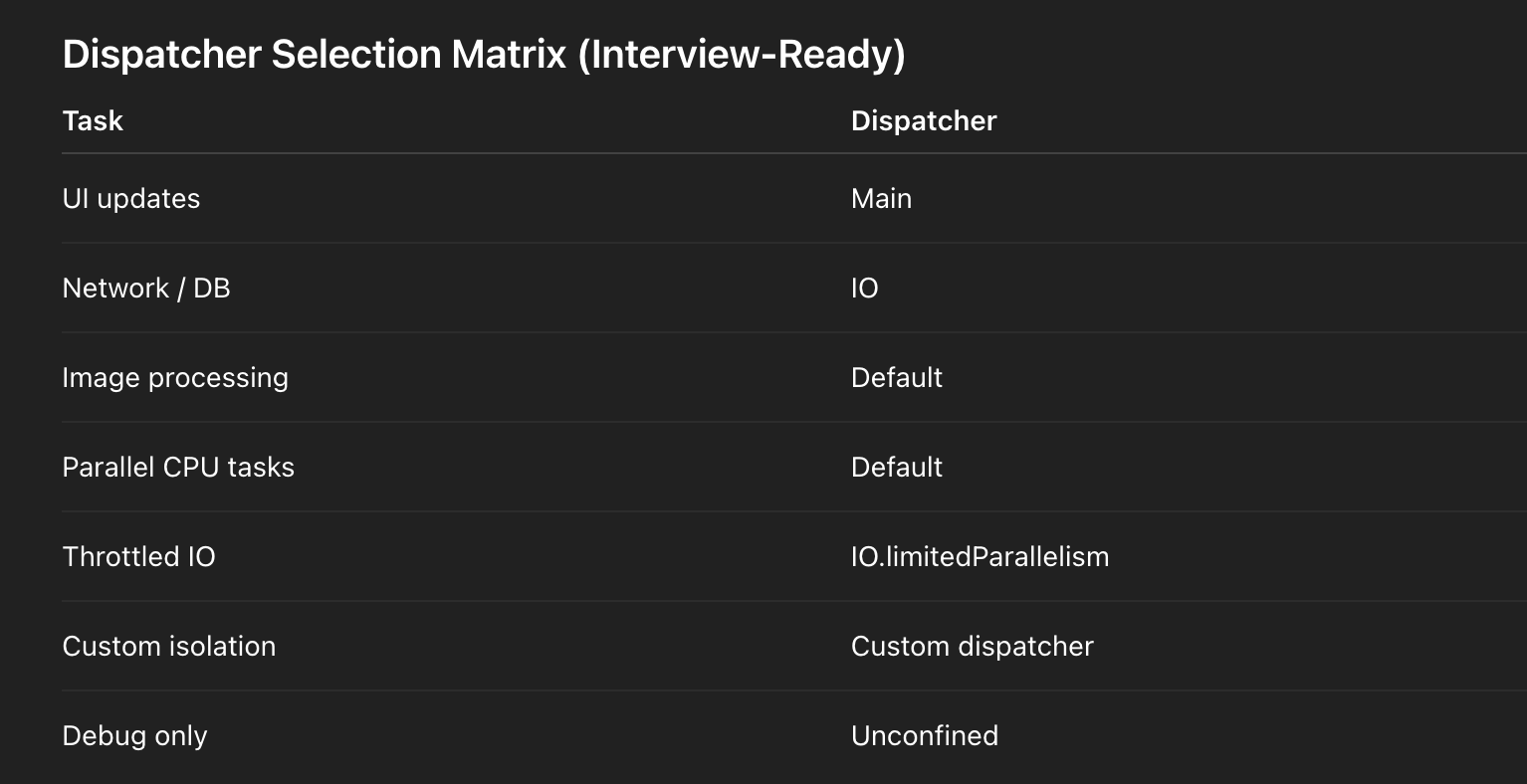
Dispatcher Selection Matrix (Interview-Ready)
Performance & Context Switching (Advanced)
Why dispatcher pinning matters:
- Thread hops cost ~10–20% performance
withContextminimizes unnecessary switching- Keeping related work on same dispatcher improves cache locality
Common Interview Pitfalls
❌ Using IO for CPU work
❌ Using Default for network
❌ Creating Executors without closing
❌ Nested launches instead of withContext
❌ Using Unconfined casually
One-Line Architect Summary (Interview Gold)
Dispatchers define execution strategy.Mainrenders UI,IOhandles blocking operations,Defaulthandles CPU work,Unconfinedis for edge cases, and custom or limited dispatchers are used to isolate or throttle workloads without breaking structured concurrency.
43. Suspend vs blocking?
The Core Difference (Interview Opening)
Suspending does not block a thread.
Blocking does not suspend execution — it monopolizes a thread.
This single distinction explains performance, scalability, and ANR risk.
What Does “suspend” Actually Mean?
A suspend function:
- Can pause without blocking a thread
- Resumes later from the same point
Relies on continuations and state machines
Key Property
Suspension is cooperative, not preemptive.
The coroutine chooses to suspend at suspension points.
Compiler-Level Explanation (Senior Topic)
What Kotlin Does to suspend
This code:
suspend fun fetch(): User {
    val user = api.getUser()
    return user
}
Is compiled roughly into:
fun fetch(continuation: Continuation<User>): AnyBehind the scenes:
- Local variables become fields
- Each suspension point becomes a state
- Execution resumes via a state machine
➡️ No thread is blocked
➡️ Stack is saved in heap
➡️ Thread returns to pool
Continuation-Passing Style (CPS)
Continuation<T>= “what to do next”- When suspension occurs:
- Thread is released
- Continuation is stored
- When data is ready:
- Coroutine resumes on a dispatcher
Blocking (Thread-Based Model)
Example of Blocking
Thread.sleep(1000)or
val response = call.execute() // Retrofit blocking callWhat Happens?
- Thread is occupied
- Cannot run other tasks
- Limited by thread count
- Causes starvation & ANRs
Thread Utilization Comparison
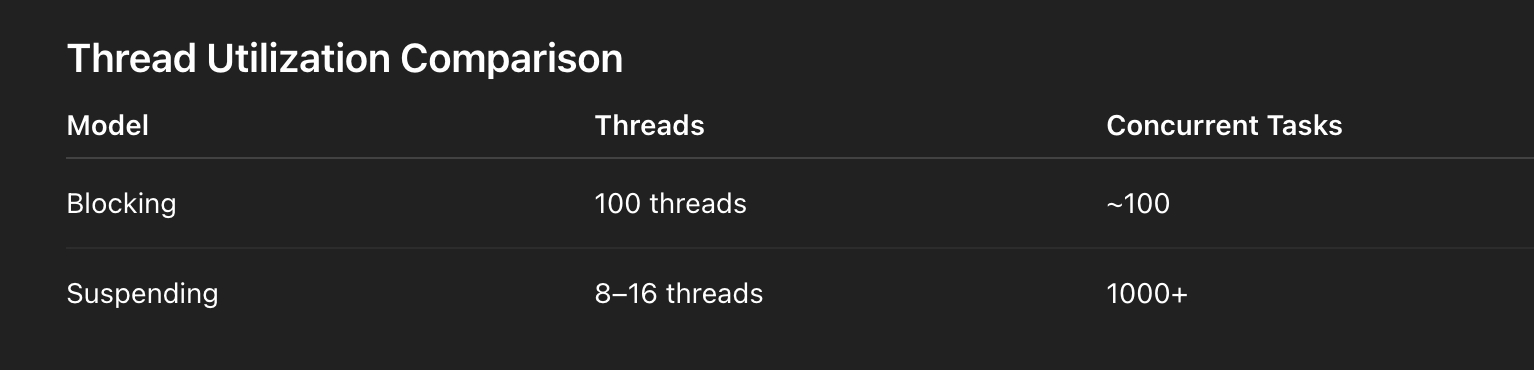
This is why coroutines scale.
Retrofit + Suspend (Non-Blocking I/O)
interface Api {
    @GET("/users/{id}")
    suspend fun getUser(@Path("id") id: String): User
}
What Retrofit Does Internally
- Uses OkHttp async APIs
- Suspends coroutine while waiting
- Resumes on completion callback
- No thread blocked during network wait
Correct Usage with Dispatcher Switching
viewModelScope.launch {
    val user = withContext(Dispatchers.IO) {
        api.getUser("123")
    }
    // Back on Main dispatcher automatically
    render(user)
}
Why This Matters
- Dispatcher defines where continuation resumes
- Structured concurrency preserved
- UI safety guaranteed
Suspending ≠ Background Thread (Common Mistake)
❌ This is WRONG:
suspend fun bad() {
    Thread.sleep(1000) // blocks!
}
✔ Correct:
suspend fun good() {
    delay(1000) // suspends
}
Blocking Inside Suspend = Silent Killer
Why It’s Dangerous
- Blocks shared thread pool
- Starves other coroutines
- Causes deadlocks
Example deadlock scenario:
withContext(Dispatchers.Main) {
    runBlocking {
        // UI thread blocked → ANR
    }
}
runBlocking — The Exception Case
What It Does
- Blocks current thread
- Bridges blocking ↔ suspending worlds
When Allowed
✔ main() functions
✔ Tests
✔ Migration code
❌ UI
❌ Production business logic
Suspension Points (Critical Concept)
A coroutine can only suspend at:
delay()await()withContext()yield()- Any other
suspendfunction
No suspension → runs like normal code.
Cancellation Awareness (Advanced)
Suspending functions:
- Are cancellable
- Throw
CancellationException - Respect cooperative cancellation
Blocking calls:
- Ignore cancellation
- Require interruption or manual handling
Performance Insight (Architect-Level)
Suspension trades stack memory for heap memory
→ Enables massive concurrency
→ Lowers memory footprint
→ Improves responsiveness
Common Interview Pitfalls
❌ Saying suspend = async thread
❌ Blocking inside suspend
❌ Using runBlocking on Main
❌ Forgetting dispatcher control
❌ Ignoring cancellation propagation
One-Line Architect Summary (Interview Gold)
A suspend function is compiled into a continuation-based state machine that can pause without blocking a thread, enabling massive concurrency. Blocking holds a thread hostage, limiting scalability and risking ANRs. Coroutines scale because suspension frees threads while preserving execution state.
44. SupervisorScope vs coroutineScope?
SupervisorScope vs Regular CoroutineScope — Deep Dive
Interviewer Question
What is the difference between coroutineScope and supervisorScope, and when do you use each?
Core Difference (One-Line Answer)
coroutineScopeenforces fail-fast structured concurrency, whilesupervisorScopeenforces failure isolation.
This single sentence already signals senior-level understanding.
coroutineScope (Default / Regular Scope)
Behavior
- Parent waits for all children
- Any child failure cancels the entire scope
- Cancellation propagates downward and sideways
coroutineScope {
    launch { taskA() }
    launch { taskB() } // fails → taskA cancelled
}
Why This Exists
- Maintains consistency
- Prevents partial or corrupted results
- Matches transactional semantics
When to Use coroutineScope
✔ Dependent tasks
✔ Multi-step workflows
✔ Transactions (all-or-nothing)
✔ Data pipelines
Example:
coroutineScope {
    val token = async { auth() }
    val data = async { fetchData(token.await()) }
    save(data.await())
}
If auth() fails → everything stops (correct behavior).
supervisorScope (Failure Isolation)
Behavior
- Child failure does NOT cancel siblings
- Parent completes when all children finish
- You must handle exceptions manually
supervisorScope {
    launch { taskA() }
    launch { taskB() } // fails → taskA continues
}
Mental Model
Children are supervised, not dependent.
Your Example — Architect Commentary
supervisorScope {
    val userDeferred = async { api.getUser("1") }
    val profileDeferred = async { api.getProfile("1") }
    val ordersDeferred = async { repo.getOrders("1") }
    try {
        UserProfile(
            userDeferred.await(),
            profileDeferred.await(),
            ordersDeferred.await()
        )
    } catch (profileE: Exception) {
        UserProfile(
            userDeferred.await(),
            null,
            ordersDeferred.await()
        )
    }
}
Why supervisorScope Is Correct Here
- APIs are independent
- Partial UI is acceptable
- One failure should not nuke all data
- Improves resilience and UX
This is a textbook production-grade use case.
Fire-and-Forget Use Case (Common Interview Topic)
viewModelScope.launch {
    supervisorScope {
        launch { uploadLogs() }
        launch { syncMetrics() }
    }
}
✔ One upload failure shouldn’t cancel others
✔ UI remains responsive
Exception Propagation (Critical Detail)
coroutineScope
- Exception is thrown immediately
- Cancels siblings
- Propagates to parent automatically
supervisorScope
- Exception is isolated
- If not caught, it bubbles up when
await()is called launchfailures go toCoroutineExceptionHandler
async + supervisorScope Pitfall
❌ This crashes if not awaited carefully:
supervisorScope {
    async { throw Exception("Boom") }
}
Why?
asyncstores exception- Scope completes
- Exception thrown when GC or await happens
✔ Correct:
val result = runCatching { deferred.await() }SupervisorJob vs supervisorScope (Advanced)
val scope = CoroutineScope(SupervisorJob() + Dispatchers.Main)Difference

ViewModel Default Behavior (Important)
viewModelScopeAlready uses:
SupervisorJob()Why?
- One failed coroutine shouldn’t cancel the entire ViewModel
- Aligns with UI resilience
Cancellation Still Propagates Down
⚠️ Important clarification:
Supervisor does NOT block parent cancellation.
If parent is cancelled:
- All children are cancelled
- Supervisor only changes child → sibling behavior
Common Interview Pitfalls
❌ Thinking supervisor ignores all failures
❌ Forgetting to handle async exceptions
❌ Using supervisor for dependent tasks
❌ Confusing SupervisorJob with GlobalScope
❌ Assuming siblings auto-handle errors
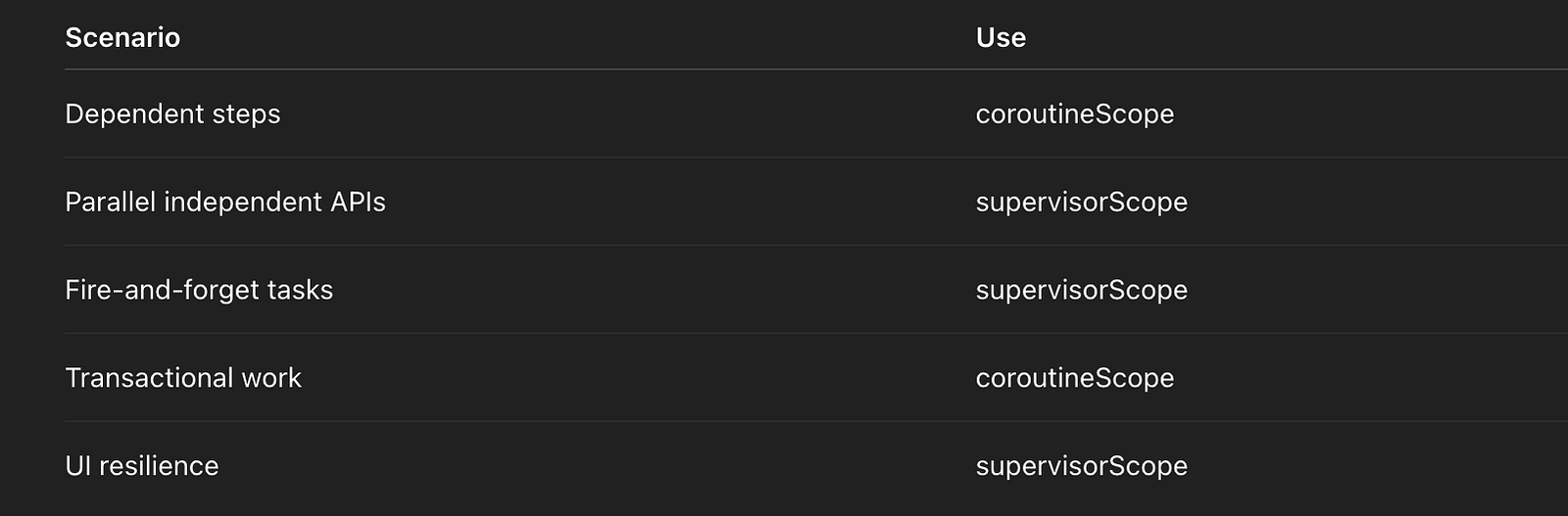
Decision Matrix (Interview-Ready)
One-Line Architect Summary (Interview Gold)
coroutineScopeenforces fail-fast consistency by cancelling siblings on any child failure, whilesupervisorScopeisolates failures so independent tasks can continue — making it ideal for parallel IO and resilient UI workflows.
45. LaunchedEffect use?
LaunchedEffect in Jetpack Compose — When and Why?
Interviewer Question
What is LaunchedEffect in Compose, and when should we use it?
One-Line Architect Answer (Start With This)
LaunchedEffect launches a lifecycle-aware coroutine tied to a Composable’s presence in the composition and is restarted whenever its key changes.That sentence already differentiates senior from mid-level.
Why LaunchedEffect Exists (The Compose Problem)
Compose is:
- Declarative
- Recomposition-driven
- Not lifecycle-callback based
You cannot safely do this:
if (query.isNotEmpty()) {
    api.search(query) // ❌ side effect during composition
}
Because:
- Composition can run many times
- Side effects must be controlled, repeatable, cancellable
LaunchedEffect exists to contain side effects safely.
What LaunchedEffect Does Internally
When Compose encounters:
LaunchedEffect(key) { block }Compose:
- Creates a coroutine scope
- Ties it to the Composable lifecycle
- Launches the coroutine after composition
- Cancels and restarts it when the key changes
- Cancels it when the Composable leaves composition
It is structured concurrency for UI side effects.
Key-Based Restart Semantics (Critical Concept)
LaunchedEffect(query) { ... }querychanges → previous coroutine cancelled- New coroutine launched with latest state
- Guarantees latest-value execution
This is why it’s perfect for:
- Search
- Debounce
- Subscriptions
- One-shot events
Your Example — Architect Commentary
@Composable
fun SearchScreen(
    query: String,
    onResults: (List<Result>) -> Unit
) {
    LaunchedEffect(query) {
        delay(300) // debounce
        val results = api.search(query)
        onResults(results)
    }
    TextField(
        value = query,
        onValueChange = { /* update state */ }
    )
}
Why This Is Correct
✔ Cancels stale searches
✔ Prevents race conditions
✔ Automatically lifecycle-safe
✔ No manual job management
This is textbook Compose-correct.
LaunchedEffect vs rememberCoroutineScope (Very Common Interview Trap)
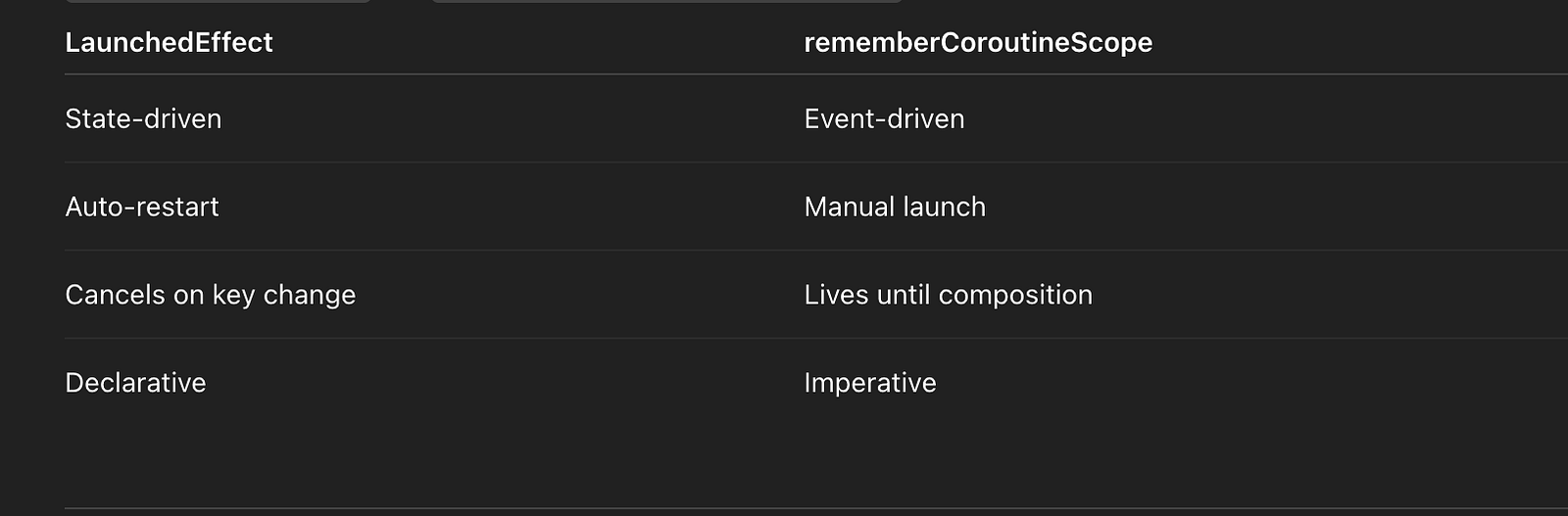
Correct Usage Split
✔ State changes → LaunchedEffect
✔ User actions (clicks) → rememberCoroutineScope
val scope = rememberCoroutineScope()

Button(onClick = {
    scope.launch { submit() }
})
Key Selection Rules (Senior Insight)
Multiple Keys
LaunchedEffect(userId, filter) { ... }Restarts when any key changes
Stable Keys Matter
❌ Bad:
LaunchedEffect(viewModel) // unstable✔ Good:
LaunchedEffect(viewModel.userId)No Keys = Infinite Relaunch (Pitfall)
LaunchedEffect(Unit) { ... } // runs onceBut:
LaunchedEffect() { ... } // ❌ compile errorCompose forces you to think about restart semantics.
Cancellation Semantics (Important)
When key changes:
- Coroutine is cancelled
CancellationExceptionis thrown- New coroutine starts immediately
This makes debounce patterns trivial.
When NOT to Use LaunchedEffect
❌ For business logic
❌ For long-running background work
❌ For user-initiated events
❌ For ViewModel state mutation directly
LaunchedEffect is UI-side orchestration only.DisposableEffect vs LaunchedEffect
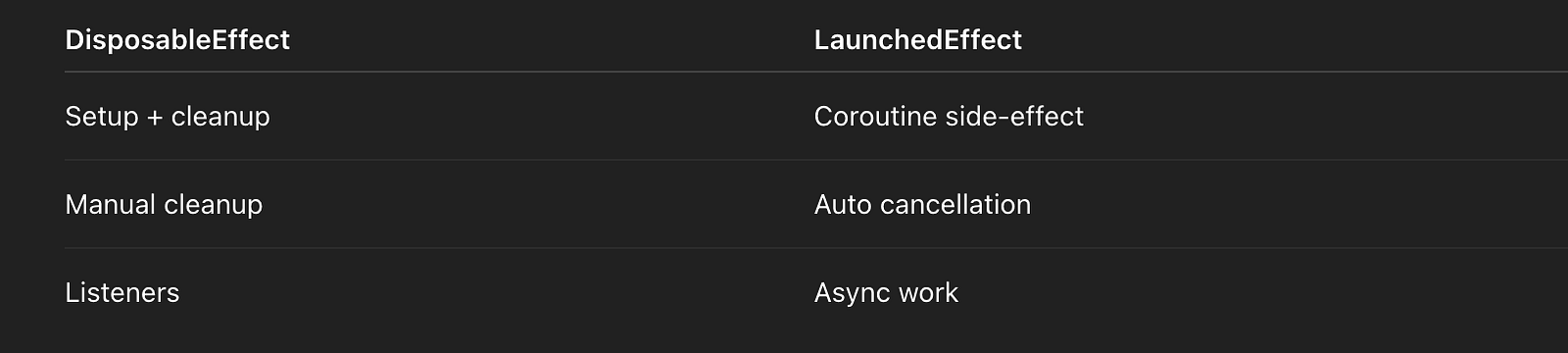
Example:
DisposableEffect(Unit) {
    registerListener()
    onDispose { unregisterListener() }
}
SideEffect (For Completeness)
SideEffect {
    analytics.trackScreen()
}
✔ Runs after every successful recomposition
❌ No coroutine
❌ No cancellation
Common Interview Pitfalls
❌ API calls directly in composition
❌ Using rememberCoroutineScope for state observation
❌ Forgetting keys
❌ Infinite relaunch loops
❌ Treating LaunchedEffect as ViewModel logic
Mental Model (Architect-Level)
Compose describes UI.LaunchedEffectdescribes “what should happen because the UI is in this state.
One-Line Architect Summary (Interview Gold)
LaunchedEffect is a Compose side-effect API that launches a coroutine tied to composition and restarts it whenever its key changes, making it ideal for state-driven asynchronous work like debouncing, subscriptions, and one-shot effects.46. Flow backpressure?
Interviewer Question
How do you handle backpressure in Kotlin Flows?
Start With the Big Insight (Architect-Level)
Flows are suspending by default, so backpressure is naturally supported — but you still need operators to control what to drop, buffer, or cancel when producers outpace consumers.
This immediately differentiates Flow from RxJava.
What Is Backpressure (Quick Definition)
Backpressure occurs when:
- Producer emits faster than consumer can process
- Without control → memory growth, UI jank, ANRs
In UI apps, this is constant:
- Typing
- Scrolling
- Sensors
- Network streams
Why Flow Is Different From RxJava
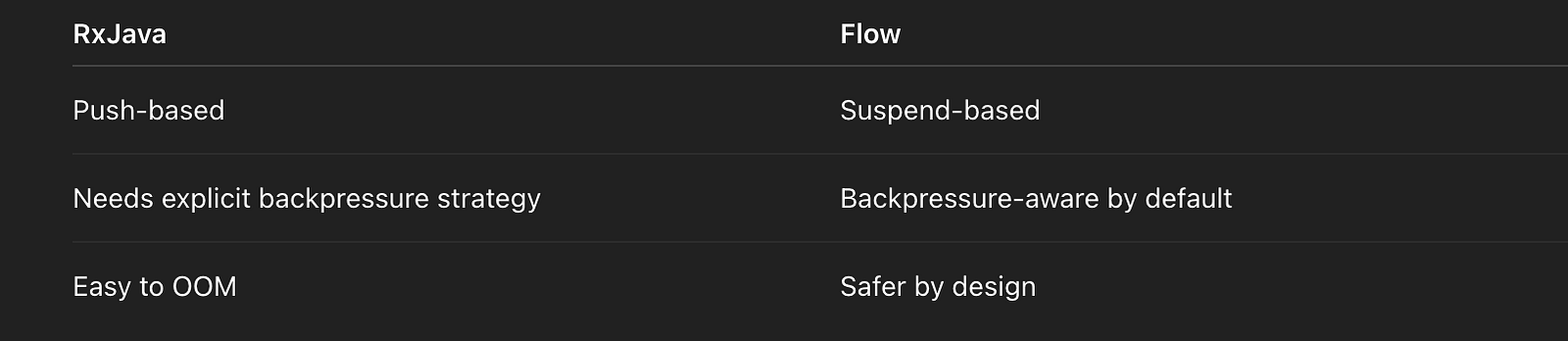
Flow suspends the producer instead of flooding the consumer.
Default Flow Behavior (Important)
flow {
    emit(1)
    emit(2)
}emit()suspends if collector is slow- No buffering unless you ask for it
- This is why Flow is safe by default
Backpressure Control Operators (Core Topic)
1. buffer()
.buffer(capacity = 64)What it does:
- Allows producer to run ahead
- Stores emissions in a buffer
- Suspends only when buffer is full
Trade-off:
✔ Higher throughput
❌ Memory usage
⚠️ Unbounded buffer = OOM risk
2. conflate()
.conflate()What it does:
- Drops intermediate values
- Keeps only latest
- Consumer always sees newest data
Perfect for:
✔ UI rendering
✔ Progress updates
✔ Sensor data
3. collectLatest() / mapLatest()
.mapLatest { value ->
    longRunningWork(value)
}
What it does:
- Cancels previous work on new emission
- Ensures only latest result is processed
Key insight:
Cancellation is a backpressure strategy.
4. debounce()
.debounce(300)What it does:
- Waits for silence
- Drops rapid bursts
Used for:
✔ Search
✔ Auto-complete
✔ User typing
5. distinctUntilChanged()
.distinctUntilChanged()What it does:
- Drops duplicate emissions
- Reduces unnecessary recomposition
6. sample()
.sample(16)What it does:
- Emits latest value at fixed intervals
- Good for UI refresh loops
Your Example — Senior-Level Analysis
val searchQuery = MutableSharedFlow<String>(
    extraBufferCapacity = 64
)

val results = searchQuery
    .debounce(300)
    .distinctUntilChanged()
    .conflate()
    .mapLatest { query ->
        api.search(query)
    }
    .flowOn(Dispatchers.IO)
    .stateIn(
        scope,
        SharingStarted.WhileSubscribed(5000),
        emptyList()
    )
Why This Is Excellent
✔ Debounce handles typing bursts
✔ mapLatest cancels stale API calls
✔ conflate protects slow UI
✔ IO dispatcher for network
✔ stateIn makes it hot + lifecycle-aware
This is production-grade reactive UI.
SharedFlow & Backpressure (Advanced Topic)
Configuration Options
MutableSharedFlow(
    replay = 0,
    extraBufferCapacity = 64,
    onBufferOverflow = BufferOverflow.DROP_OLDEST
)
Overflow strategies:
SUSPEND(default)DROP_OLDESTDROP_LATEST
StateFlow vs SharedFlow (Backpressure Angle)

flowOn() and Backpressure (Subtle but Important)
.flowOn(Dispatchers.IO)- Moves upstream execution
- Does NOT affect downstream
- Buffer implicitly inserted at dispatcher boundary
Every flowOn adds a buffer.Collection Side Backpressure
results.collect { value ->
    adapter.submitList(value) // slow UI
}
If UI is slow:
- Upstream suspends
- Or drops if conflated
- Or cancels via
mapLatest
Cancellation = Backpressure Tool (Architect Insight)
In Flow, cancellation is often more important than buffering.
This is why:
mapLatestflatMapLatestcollectLatest
Are so powerful.
Common Interview Pitfalls
❌ Assuming Flow floods memory
❌ Using unbounded buffer()
❌ Forgetting mapLatest for APIs
❌ Blocking in collectors
❌ Not understanding flowOn buffering
Decision Table (Interview-Ready)

One-Line Architect Summary (Interview Gold)
Flow handles backpressure by suspending emitters by default, and we shape behavior using operators likebuffer,conflate,debounce, andmapLatest, choosing whether to suspend, drop, or cancel work depending on UX and performance requirements.
47. withTimeout pitfalls?
Interviewer Question
How does withTimeout work, and what are its common pitfalls?
Start With the Core Truth (Architect-Level)
withTimeout does not “stop work” — it cancels the coroutine, and cancellation only works if the code cooperates.That one sentence explains 90% of bugs around timeouts.
What withTimeout Actually Does
withTimeout(10_000) {
    work()
}
Internally:
- Schedules a cancellation after the timeout
- Cancels the coroutine’s
Job - Throws
TimeoutCancellationException - Unwinds the coroutine stack
➡️ It is cooperative cancellation, not preemptive.
Exception Semantics (Critical Detail)
TimeoutCancellationException
    ↳ CancellationException
Why This Matters
- Cancellation exceptions are not errors
- They should usually be re-thrown
- Catching
Exceptionblindly is dangerous
❌ Wrong:
catch (e: Exception) { /* swallow */ }✔ Correct:
catch (e: CancellationException) {
    throw e
}
withTimeout vs withTimeoutOrNull

Your Example — Architect Commentary
suspend fun fetchWithTimeout(): Result<Data> =
    withTimeoutOrNull(10.seconds) {
        withContext(Dispatchers.IO) {
            api.fetch()
        }
    }?.let {
        Result.success(it)
    } ?: Result.failure(
        TimeoutException("10s exceeded")
    )
Why This Is Correct
✔ Avoids exception-driven logic
✔ Cancels IO coroutine
✔ Clean Result API
✔ Caller-friendly
Important Reality Check: Cancellation ≠ Interruption
This Cancels Correctly
delay(1000)This Does NOT
Thread.sleep(1000) // ignores cancellationBlocking APIs must be:
- Interruptible
- Or wrapped in
suspendCancellableCoroutine - Or manually checked via
isActive
Non-Cancellable Sections (Advanced Topic)
Why They Exist
Some cleanup must always happen, even after cancellation.
withContext(NonCancellable) {
    resource.close()
}
Rules
✔ Use only for cleanup
❌ Never for business logic
❌ Never for long-running work
Abuse of NonCancellable defeats structured concurrency.Timeout Does NOT Propagate Automatically
Common Mistake
withTimeout(5_000) {
    blockingCall() // keeps running
}
Timeout fires → coroutine cancelled → blocking work keeps running in background.
Fix Options
- Use suspend APIs
- Make calls interruptible
- Poll
coroutineContext.isActive
Retry + Timeout (Production Pattern)
retry(3) {
    withTimeout(5.seconds) {
        api.fetch()
    }
}
Or with backoff:
retryWhen { cause, attempt ->
    cause is TimeoutCancellationException && attempt < 3
}
Interaction With Structured Concurrency
- Timeout cancels current scope
- Children inherit cancellation
- Parent scope continues unless exception escapes
UI-Specific Pitfall
LaunchedEffect(Unit) {
    withTimeout(5_000) {
        collectFlow() // ❌ infinite flow
    }
}
Timeout expires → collector cancelled → flow restarts on recomposition → loop
✔ Fix: Limit collection or move to ViewModel
Common Interview Pitfalls (Call These Out)
❌ Thinking timeout stops threads
❌ Catching and swallowing cancellation
❌ Blocking inside timeout
❌ Misusing NonCancellable
❌ Using timeout for logic instead of safety
Mental Model (Architect-Level)
Timeout is just scheduled cancellation.
If the code doesn’t suspend, it won’t stop.
One-Line Architect Summary (Interview Gold)
withTimeoutcancels a coroutine after a duration by throwingTimeoutCancellationException, and because cancellation is cooperative, it only works with suspending or cancellation-aware code — making blocking calls, swallowed cancellations, and overuse ofNonCancellablethe most common pitfalls.
48. runTest Turbine?
Interviewer Question
How do you test suspend functions and Kotlin Flows in unit tests?
One-Line Architect Answer (Lead With This)
Usekotlinx-coroutines-test’srunTestto control coroutine execution and virtual time, and Turbine to assert Flow emissions deterministically without flakiness.
Why Coroutine Testing Is Hard (Context)
Coroutines introduce:
- Asynchrony
- Dispatchers
- Delays & timeouts
- Cancellation
Naive tests lead to:
❌ Thread.sleep
❌ Flaky timing issues
❌ Hanging tests
runTest solves this.
runTest — What It Really Does
@Test
fun testSomething() = runTest {
    // test body
}
Internals (Senior Detail)
- Replaces
Dispatchers.Mainwith a TestDispatcher - Uses a virtual time scheduler
- Automatically waits for child coroutines
- Fails if coroutines leak after test ends
runTest enforces structured concurrency in tests.Virtual Time Control (Critical Feature)
delay(300)
advanceTimeBy(300)- No real waiting
- Deterministic
- Enables testing debounce, retry, timeout logic
Testing Suspend Functions
@Test
fun `fetch returns data`() = runTest {
    val result = repo.fetch()
    assertEquals(expected, result)
}
✔ No runBlocking
✔ No sleeps
✔ Fully synchronous semantics
Turbine — Flow Testing Made Safe
Why Turbine?
Flows:
- Emit asynchronously
- May never complete
- Can emit errors
Turbine gives:
- Structured assertions
- Backpressure awareness
- Automatic cancellation
Your Example — Architect Commentary
@Test
fun `search emits results`() = runTest {
    val results =
        repo.search("kotlin")
            .testIn(backgroundScope())
    results.assert {
        values[0] == emptyList()
        values[1] == listOf("Kotlin", "Coroutines")
        complete()
    }
    verify { api.search("kotlin") }
}
Why This Is Correct
✔ Uses runTest
✔ Collects Flow in background scope
✔ Deterministic emission order
✔ No hanging collectors
✔ Clean verification
Preferred Turbine Style (Idiomatic)
repo.search("kotlin").test {
    assertEquals(emptyList(), awaitItem())
    assertEquals(listOf("Kotlin", "Coroutines"), awaitItem())
    awaitComplete()
}
Why This Is Better
- Explicit order
- Fails fast
- No index-based assumptions
- Cleaner failure messages
Handling Infinite Flows
.test {
    assertEquals(first, awaitItem())
    cancelAndIgnoreRemainingEvents()
}
Always cancel infinite flows, or tests will hang.
Testing Time-Based Operators
Debounce Example
@Test
fun `debounce delays emission`() = runTest {
    val flow = queryFlow.debounce(300)
    flow.test {
        queryFlow.emit("k")
        advanceTimeBy(100)
        queryFlow.emit("ko")
        advanceTimeBy(300)
        assertEquals("ko", awaitItem())
        cancelAndIgnoreRemainingEvents()
    }
}
✔ No sleeps
✔ Fully deterministic
backgroundScope vs Test Scope (Advanced)
test {}→ auto-managedtestIn(backgroundScope())→ manual control- Use background scope for:
- Shared flows
- Hot streams
- Long-lived producers
Common Testing Pitfalls (Interview Gold)
❌ Using runBlocking
❌ Using real Dispatchers.IO
❌ Forgetting to cancel infinite flows
❌ Relying on real time
❌ Leaking coroutines after test
Dispatcher Injection (Production Best Practice)
class Repo(
    private val dispatcher: CoroutineDispatcher
)
Test:
Repo(dispatcher = StandardTestDispatcher(testScheduler))Always inject dispatchers for testability.
runTest vs runBlocking
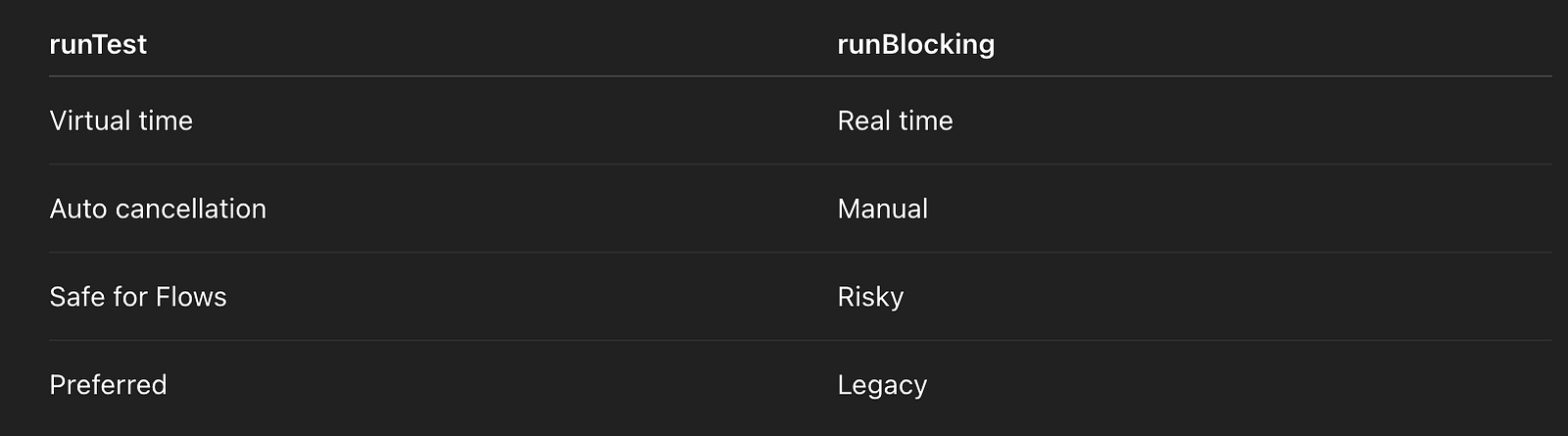
Coverage & Reliability
- Enables 95%+ coroutine coverage
- Zero flakiness
- Fast CI execution
Mental Model (Architect-Level)
runTest turns asynchronous coroutine code into deterministic, synchronous test logic, and Turbine provides structured assertions for reactive streams.One-Line Architect Summary (Interview Gold)
Suspend functions and Flows are tested using runTest to control coroutine execution and virtual time, and Turbine to assert Flow emissions deterministically while preventing leaks and flaky timing-based failures.49. Sealed class?
Interviewer Question
Why do we use sealed classes for results or UI states?
One-Line Architect Answer (Lead With This)
Sealed types model a closed, finite set of states and give the compiler the ability to enforce exhaustive handling — which is critical for correctness in UI and domain logic.
What Is a Sealed Class / Interface?
A sealed type:
- Restricts who can implement it (same module/file)
- Represents a known, closed hierarchy
- Enables exhaustive
whenexpressions - Eliminates “impossible states”
This is algebraic data types (ADT) in Kotlin.
Sealed Class vs Sealed Interface (Senior Detail)

Architect preference (2024+): sealed interface unless you need base state.Compiler Exhaustiveness (Key Benefit)
when (state) {
    is Result.Success -> show(state.data)
    is Result.Error -> showError(state.exception)
    Result.Loading -> showLoading()
}
✔ No else needed
✔ Compiler error if a case is missing
✔ Safe refactoring
Your Example — Architect Commentary
sealed interface Result<out T> {
    data class Success<T>(val data: T) : Result<T>
    data class Error(val exception: Throwable) : Result<Nothing>
    data object Loading : Result<Nothing>
}
Why This Is Excellent
✔ Covariant out T
✔ Nothing for non-data states
✔ data object avoids allocation
✔ Closed state space
This is production-grade modeling.
Why Not Exceptions for State?
❌ Exceptions:
- Non-exhaustive
- Hard to test
- Implicit control flow
- UI-unfriendly
✔ Sealed results:
- Explicit
- Testable
- Serializable
- UI-safe
Domain vs UI State (Important Distinction)
Domain Result
sealed interface Result<out T> {
    data class Success<T>(val data: T) : Result<T>
    data class Failure(val cause: Throwable) : Result<Nothing>
}
UI State
@Immutable
sealed interface UiState {
    data object Idle : UiState
    data object Loading : UiState
    data class Content(val user: User) : UiState
    data class Error(val message: String) : UiState
}
Do not leak domain errors directly into UI.
Compose Integration (Senior-Level)
Why @Immutable Matters
@Immutable
sealed interface UiState- Allows Compose to skip recompositions
- Improves performance
- Makes state stability explicit
ViewModel Usage Pattern (Correct)
fun load() = viewModelScope.launch {
    _state.value = Result.Loading
    _state.value = try {
        Result.Success(api.fetchUser())
    } catch (e: Exception) {
        Result.Error(e)
    }
}
✔ Single source of truth
✔ No partial states
✔ Predictable rendering
Smart Casting & Safety
when (val s = state) {
    is Result.Success -> use(s.data) // smart cast
    is Result.Error -> handle(s.exception)
    Result.Loading -> showSpinner()
}- No unsafe casts
- Compiler-verified logic
Sealed + Flow / StateFlow (Common Pattern)
val uiState: StateFlow<UiState>✔ Observable
✔ Lifecycle-aware
✔ Immutable
Common Pitfalls (Interview Gold)
❌ Adding else to when
❌ Using nullable states instead of sealed
❌ Mixing domain + UI concerns
❌ Overloading Result with too many states
❌ Forgetting immutability in Compose
Sealed vs Enum vs Data Class

If state transitions matter → sealed.
Evolution Safety (Architect Insight)
Adding:
data object Empty : Result<Nothing>Compiler forces:
- Every
whento update - Zero runtime bugs
One-Line Architect Summary (Interview Gold)
Sealed classes and interfaces let us model a closed set of states with compiler-enforced exhaustiveness, making UI and domain logic safer, more readable, and easier to evolve — especially when combined with StateFlow and Compose.
50. Data class equals?
Interviewer Question
How do equals() and hashCode() work for Kotlin data classes?
One-Line Architect Answer (Lead With This)
Kotlin data classes implement structural equality by generatingequals()andhashCode()based on all primary-constructor properties, using shallow comparison.
That single sentence already signals senior-level understanding.
What Kotlin Generates for a Data Class
For:
data class UserUi(
    val id: String,
    val name: String,
    val avatarUrl: String
)
The compiler generates:
equals(other: Any?)hashCode()toString()copy()componentN()functions
Equality Semantics
user1 == user2✔ Compares each primary constructor property
✔ Uses == on each property
✔ Order matters
✔ Shallow comparison
Structural vs Referential Equality (Must Explain)

Data classes override equals, so == compares values, not references.
Shallow Equality — The Critical Detail
data class Wrapper(val list: List<Int>)listcomparison usesList.equals- If a property is mutable, equality can change over time
- Nested objects are not deeply copied or frozen
Data class equality is shallow, not deep.
Why This Matters in Production
1. Collections (HashMap / HashSet)
val set = hashSetOf(user)
user.name = "New Name" // ❌ if mutable- Hash code changes
- Object becomes unfindable
- Undefined behavior
✔ Rule: Never use mutable properties in equals/hashCode
2. Compose Recomposition (Very Important)
Compose relies heavily on:
equals()- Stability inference
- Referential identity
@Immutable
data class UserUi(
    val id: String,
    val name: String,
    val avatarUrl: String
)
✔ Immutable properties
✔ Stable equality
✔ Efficient recomposition
Stable Keys in Compose (Your Example — Correct)
LazyColumn {
    items(users, key = { it.id }) { user ->
        UserRow(user)
    }
}
Why This Is Critical
- Prevents item reuse bugs
- Preserves scroll position
- Avoids recomposition storms
equals()alone is not enough
Keys define identity; equals defines equality.
copy() and Equality
val updated = user.copy(name = "New")- New instance
- Different
equalsresult - Referentially different
- Structurally different if any field changed
This is intentional and powers unidirectional state flow.
When You SHOULD Override equals() / hashCode()
Entity Identity (Domain Models)
data class User(
    val id: String,
    val name: String,
    val email: String
) {
    override fun equals(other: Any?) =
        other is User && other.id == id
    override fun hashCode() = id.hashCode()
}
Why?
- Entity identity is
id, not full state - Fields may change
- Prevents false inequality
When You Should NOT Override
❌ UI models
❌ Value objects
❌ State holders
❌ Compose UiState
UI models benefit from full structural equality.
Data Class vs Regular Class Equality

Compose Stability Annotations (Advanced)
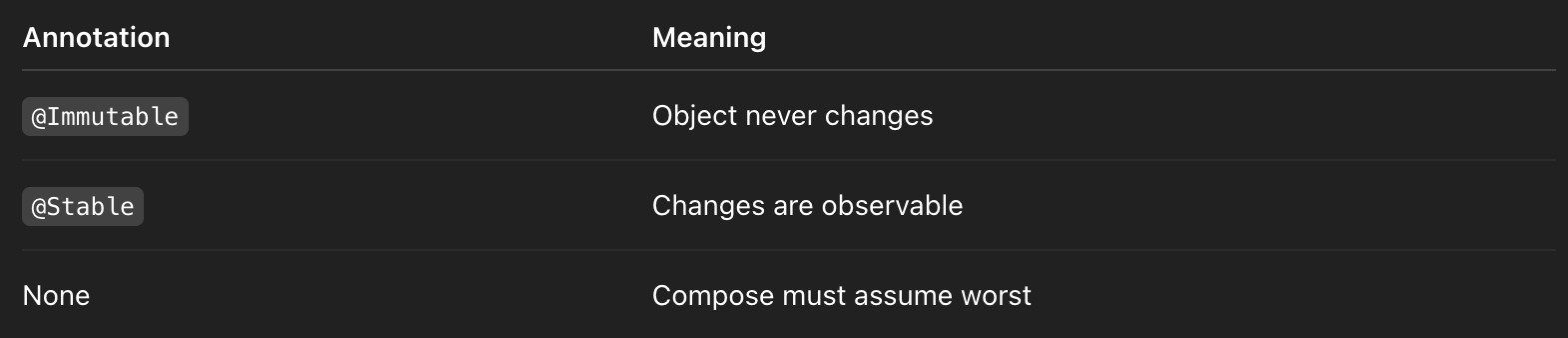
⚠️ Nested mutable types break immutability guarantees.
Common Interview Pitfalls (Call These Out)
❌ Assuming deep equality
❌ Using mutable properties
❌ Forgetting hashCode when overriding equals
❌ Relying on equals instead of keys in Lazy lists
❌ Using data classes for entities blindly
Decision Guide (Interview-Ready)
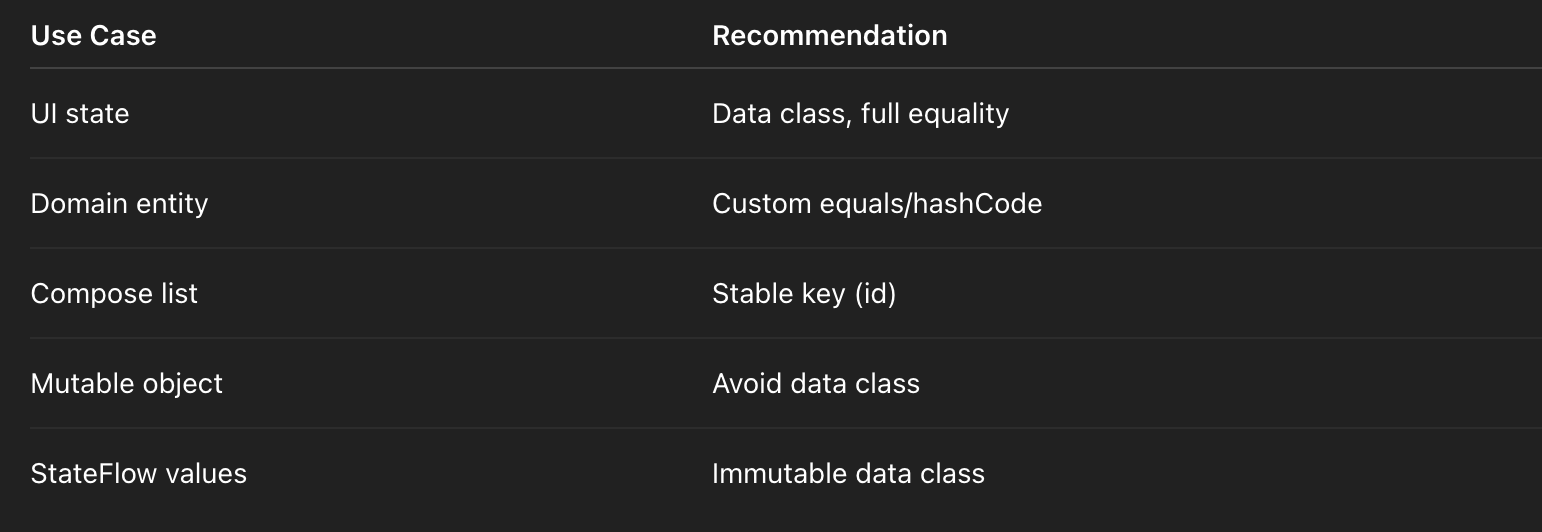
Mental Model (Architect-Level)
Data classes are value types.
If identity matters more than value, override equality.
If value matters, let the compiler do the work.
One-Line Architect Summary (Interview Gold)
Kotlin data classes generate structural, shallowequals()andhashCode()implementations based on all primary-constructor properties, which is ideal for immutable UI state but often needs customization for domain entities where identity—not full state—defines equality.


Comments
Post a Comment